Modern Expense Report Software

Simplify expense reporting with Sage Expense Management (formerly Fyle). Track receipts, report expenses, reconcile credit card spend, process reimbursements, and sync data to your accounting software.

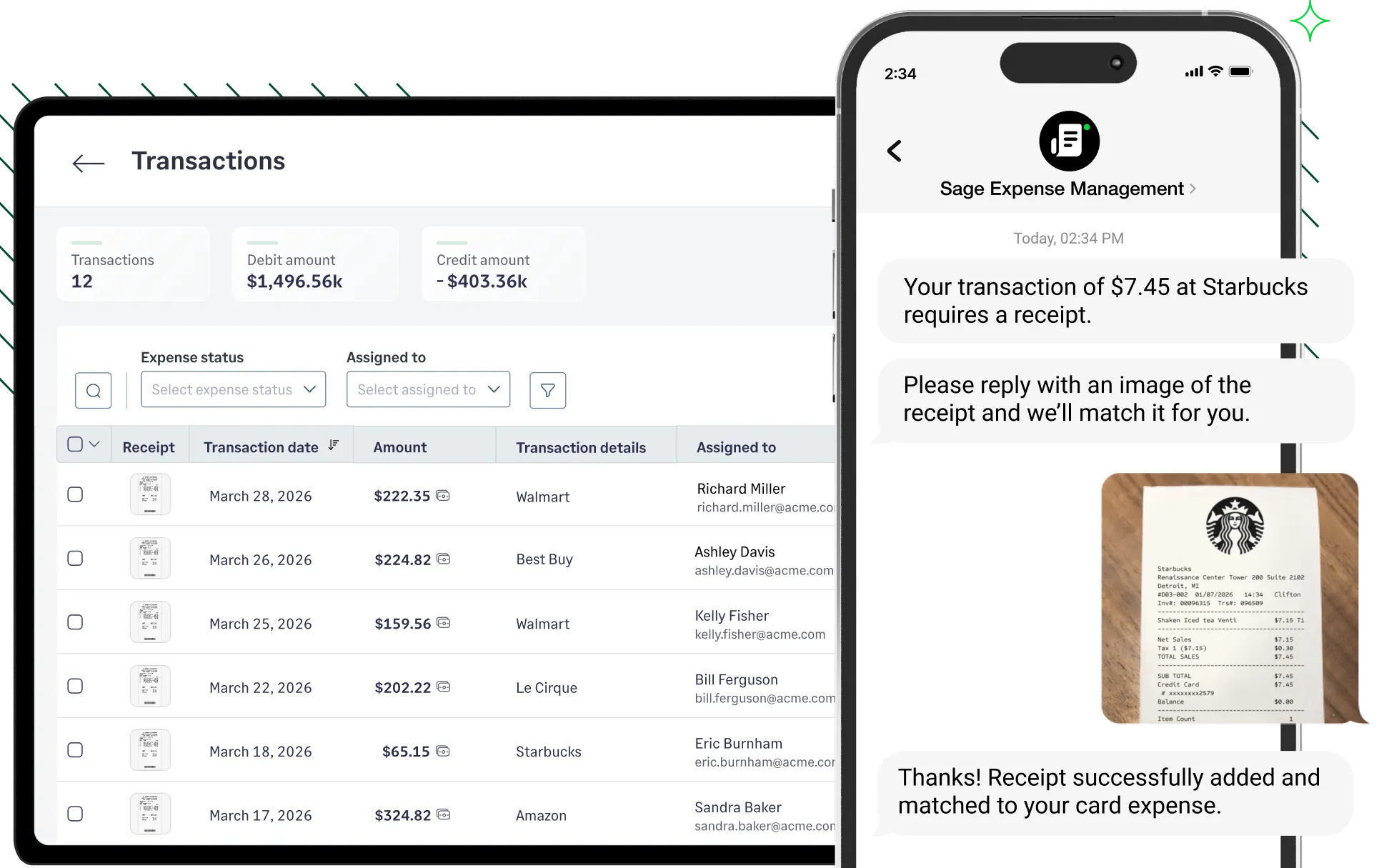
Sage Expense Management dashboard with card transactions alongside text based receipt matching.
Rating stars 4.6/5 1775+ reviews

Trusted by 2500+ Customers

  • Aprio logo
  • Centric logo
  • Disruptive logo
  • E3 Environmental logo
  • Encore logo
  • May Mobility logo
  • Keystone logo
  • Sprenger logo
  • Classic Collision logo
  • CCS Construction logo
  • Williams homes logo

Why choose Sage Expense Management for expense reporting

Capture receipts in seconds
Reconcile any business credit card
Pre-submission policy checks
Bi-directional accounting sync

Stop hoarding crumpled paper receipts in your wallet.

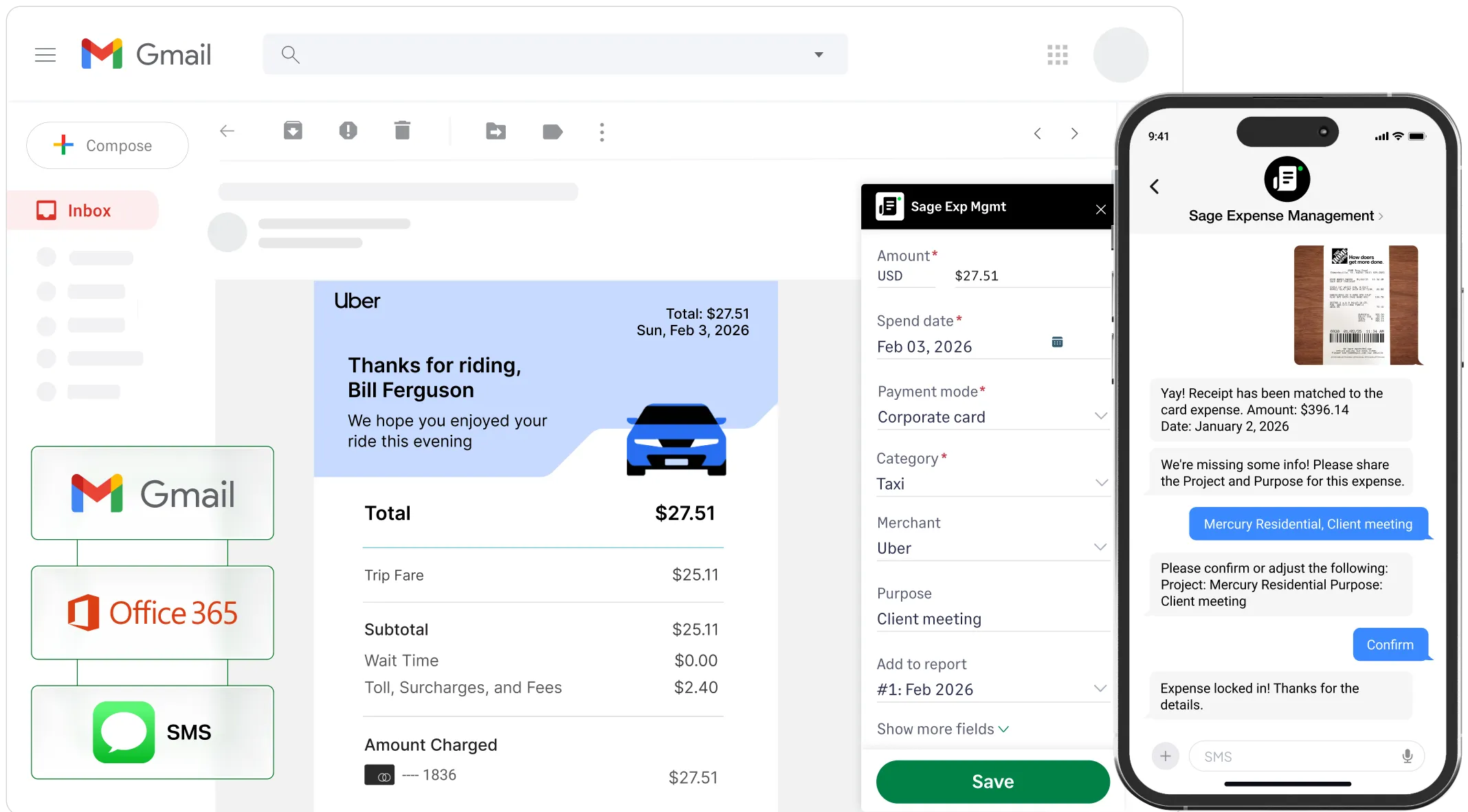
Sage Expense Management allows your team to submit receipts via text, email, or the mobile app. Our AI automatically extracts receipt details, so your employees never have to deal with manual data entry.

Receipt collection
Receipt capture features of Sage Expense Management via Gmail, Outlook, and text message

Keep the business cards your team already uses and loves.

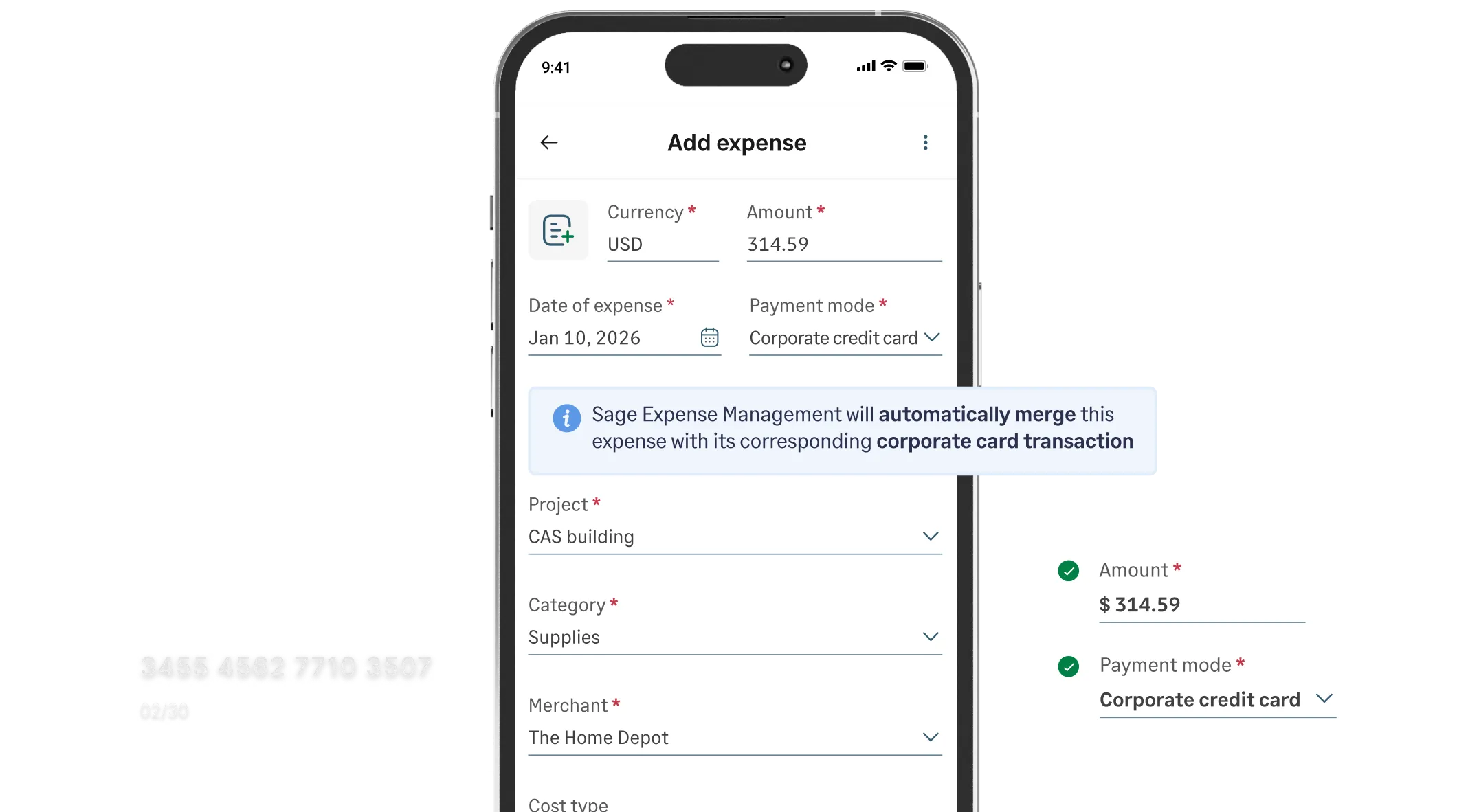
Sage Expense Management is card-agnostic, connecting directly to the Visa and Mastercard networks to fetch spend data in real-time. Link your existing cards to start matching receipts instantly, without switching banks or issuing new cards.

Credit card reconciliation
Sage Expense Management mobile app showing an expense being reconciled with a card transaction.

Out-of-policy spend shouldn’t be a surprise you find at month-end.

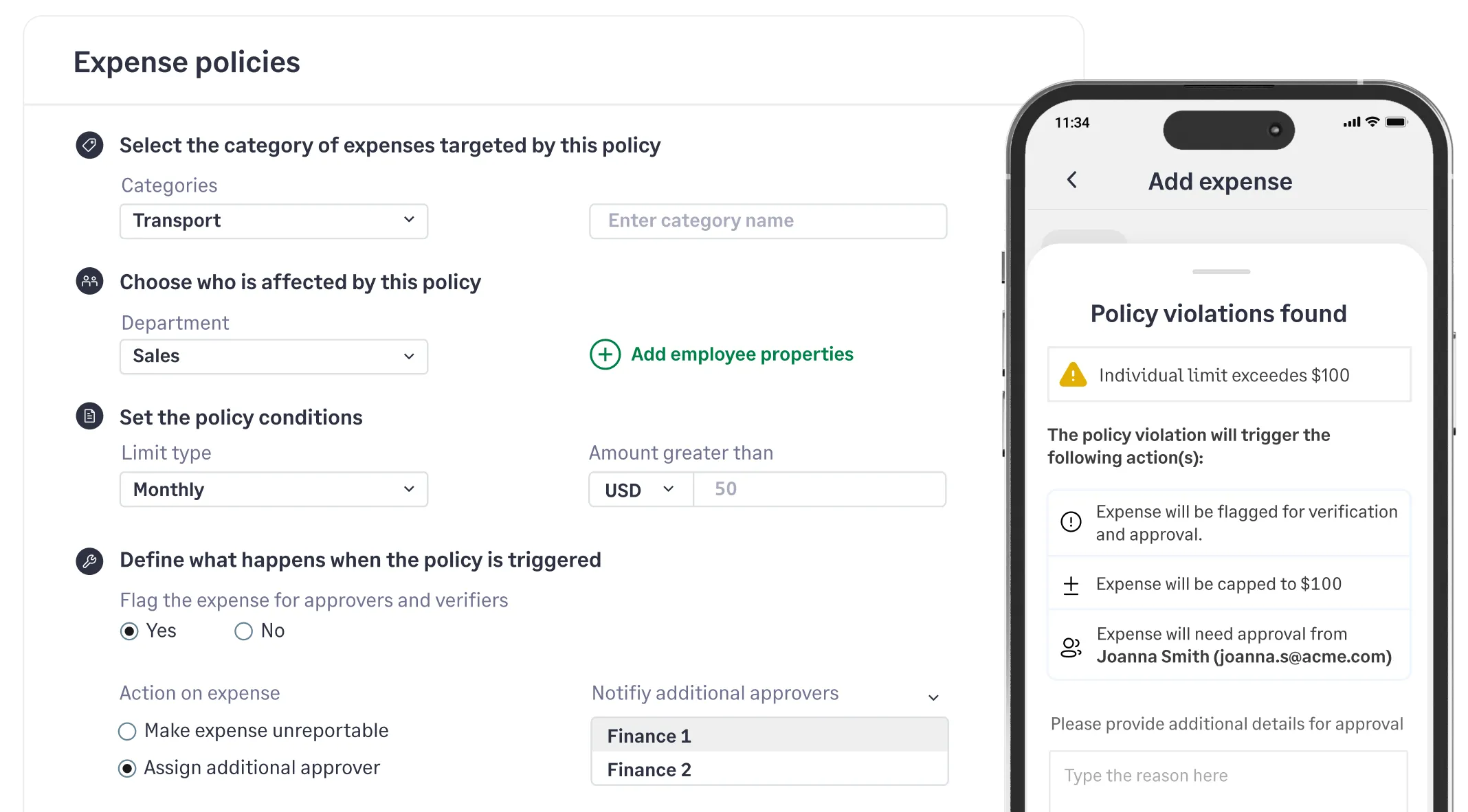
Sage Expense Management flags violations in real-time, notifying employees of policy breaches the moment they try to submit an expense. Whether it’s a duplicate receipt or a limit violation, you can ensure 100% compliance without the manual back-and-forth.

Compliance and control
Sage Expense Management screen for configuring expense policies and a mobile view showing a policy violation alert

Auto-coding: From swipe to GL in seconds

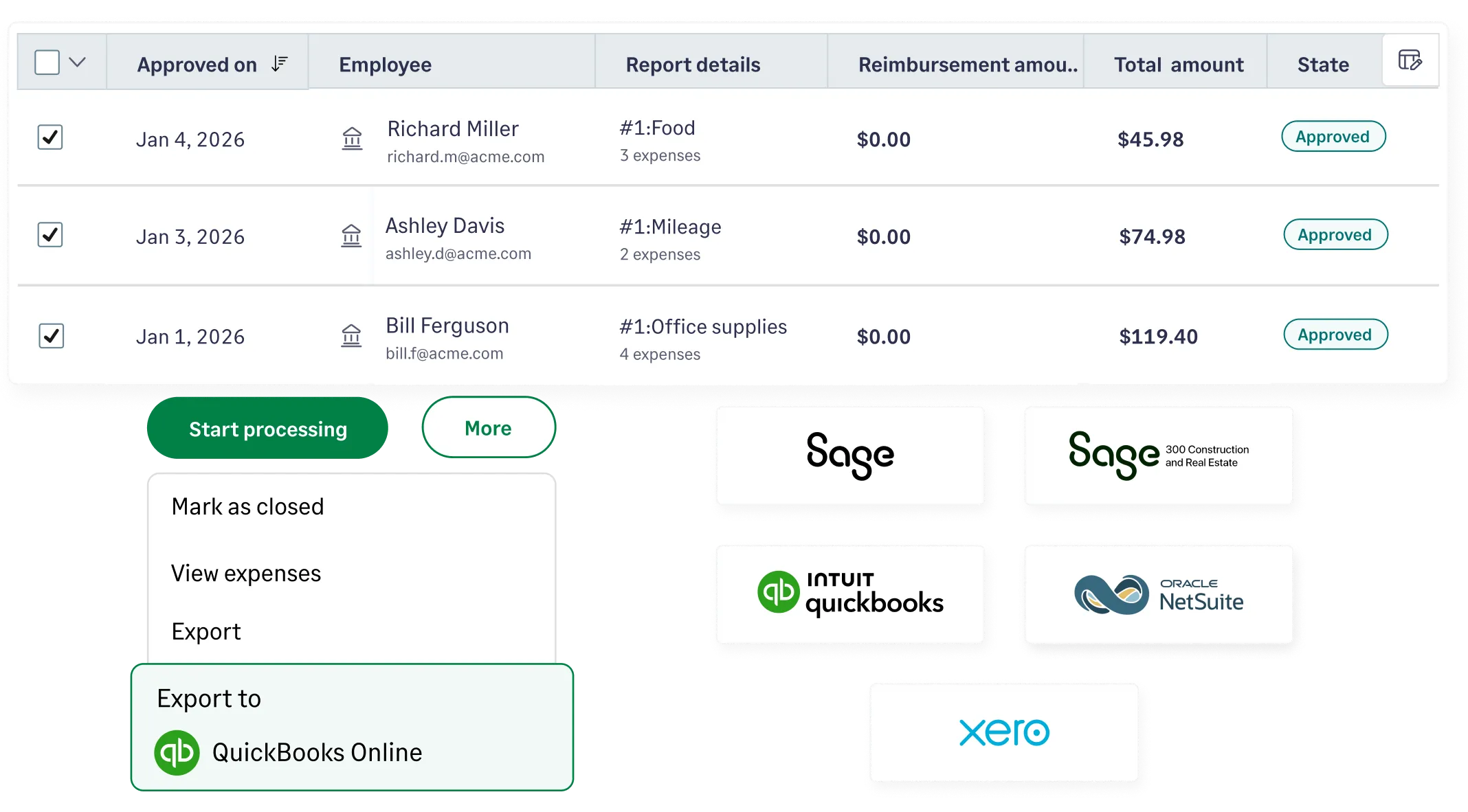
Sage Expense Management syncs directly to Sage, QuickBooks, NetSuite, and Xero, automating accounting sync. By pulling your latest categories and pushing verified expenses back, we ensure your records are always up-to-date.

Accounting integrations
Logos of Sage Expense Management integrations including QuickBooks, NetSuite, Xero, Sage, and Sage 300 CRE

Why choose Sage Expense Management for expense reporting

Capture receipts in seconds
Reconcile any business credit card
Pre-submission policy checks
Bi-directional accounting sync

Stop hoarding crumpled paper receipts in your wallet.

Sage Expense Management allows your team to submit receipts via text, email, or the mobile app. Our AI automatically extracts receipt details, so your employees never have to deal with manual data entry.

Receipt collection

Keep the business cards your team already uses and loves.

Sage Expense Management is card-agnostic, connecting directly to the Visa and Mastercard networks to fetch spend data in real-time. Link your existing cards to start matching receipts instantly, without switching banks or issuing new cards.

Credit card reconciliation

Out-of-policy spend shouldn’t be a surprise you find at month-end.

Sage Expense Management flags violations in real-time, notifying employees of policy breaches the moment they try to submit an expense. Whether it’s a duplicate receipt or a limit violation, you can ensure 100% compliance without the manual back-and-forth.

Compliance and control

Auto-coding: From swipe to GL in seconds

Sage Expense Management syncs directly to Sage, QuickBooks, NetSuite, and Xero, automating accounting sync. By pulling your latest categories and pushing verified expenses back, we ensure your records are always up-to-date.

Accounting integrations
Receipt capture features of Sage Expense Management via Gmail, Outlook, and text message
Sage Expense Management mobile app showing an expense being reconciled with a card transaction.
Sage Expense Management screen for configuring expense policies and a mobile view showing a policy violation alert
Logos of Sage Expense Management integrations including QuickBooks, NetSuite, Xero, Sage, and Sage 300 CRE

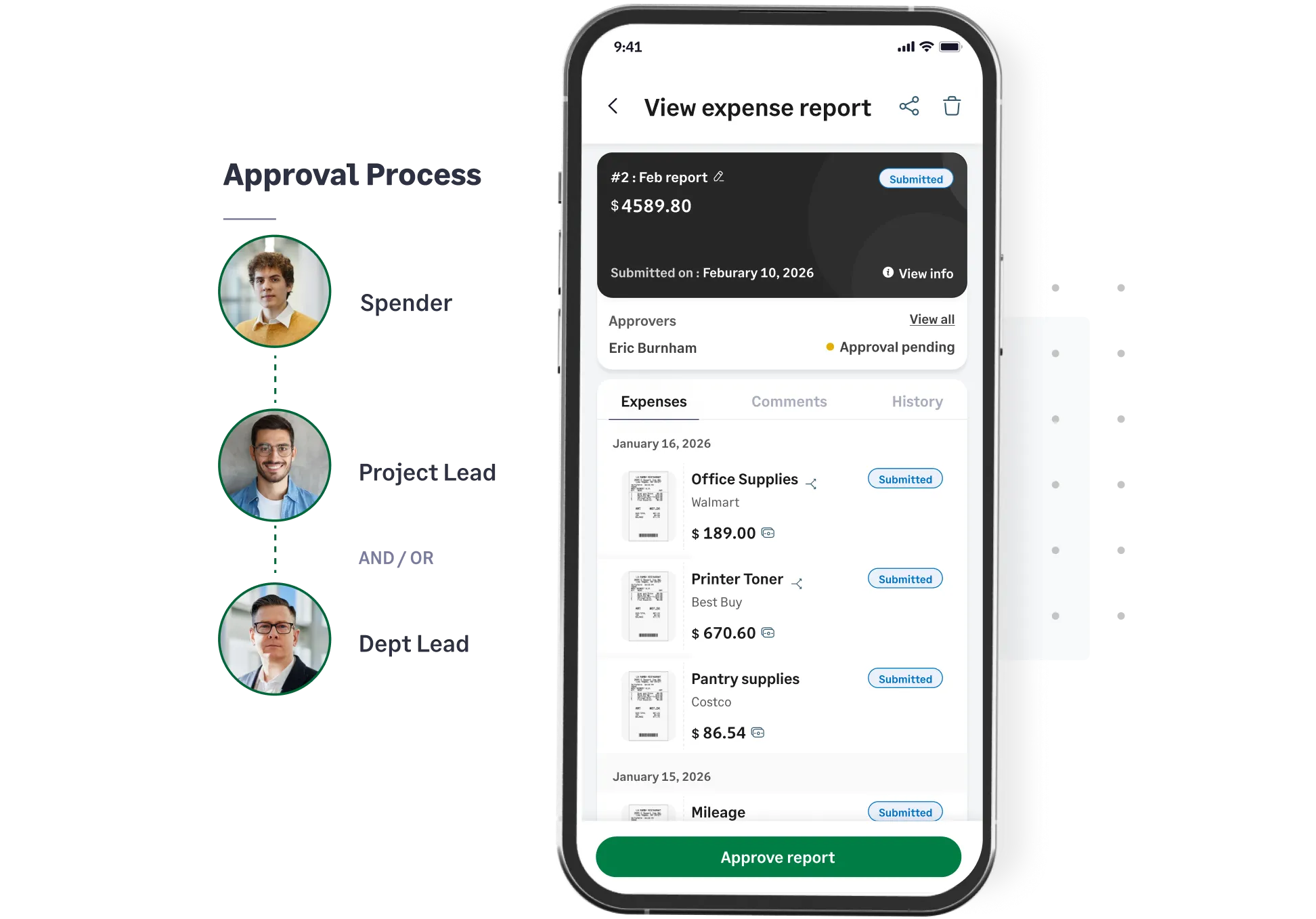
On-the-go approvals

Sage Expense Management lets approvers review and approve reports directly from Slack, Gmail, Outlook, or our mobile app.

Whether they are between meetings or at the airport, they can clear their queue in one click without ever needing to log into a complex dashboard.

Approval workflows
Visual diagram of a multi-level approval process in Sage Expense Management

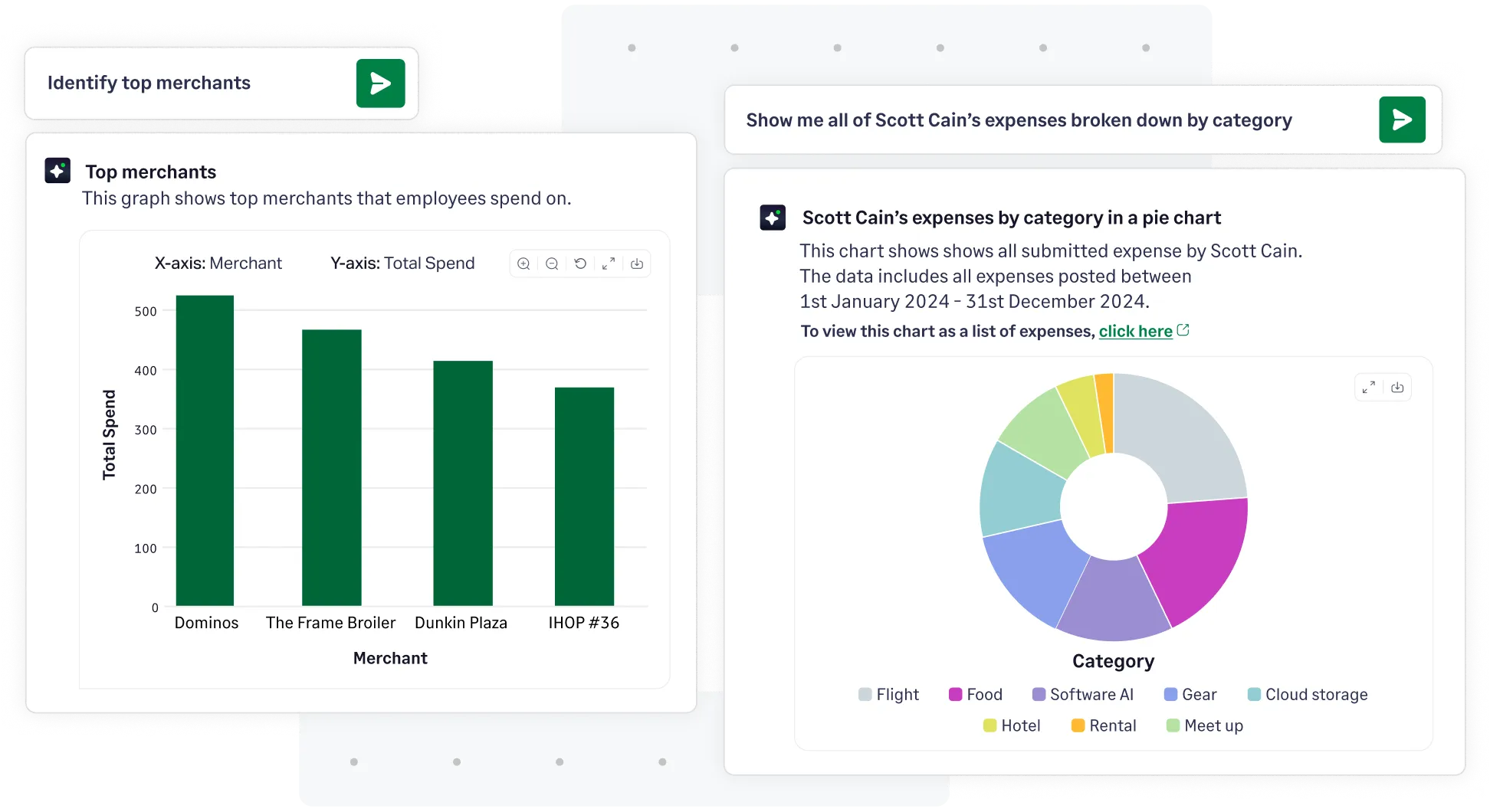
Total visibility into company-wide spend

Get a real-time, centralized view of every dollar spent across departments, projects, and individual employees.

Our intuitive dashboard turns raw expense data into actionable insights, helping you spot trends and stay under budget effortlessly before the money is even spent.

Explore analytics
Employee view dashboard in Sage Expense Management showing total spend, expense counts, and primary approvers by department.

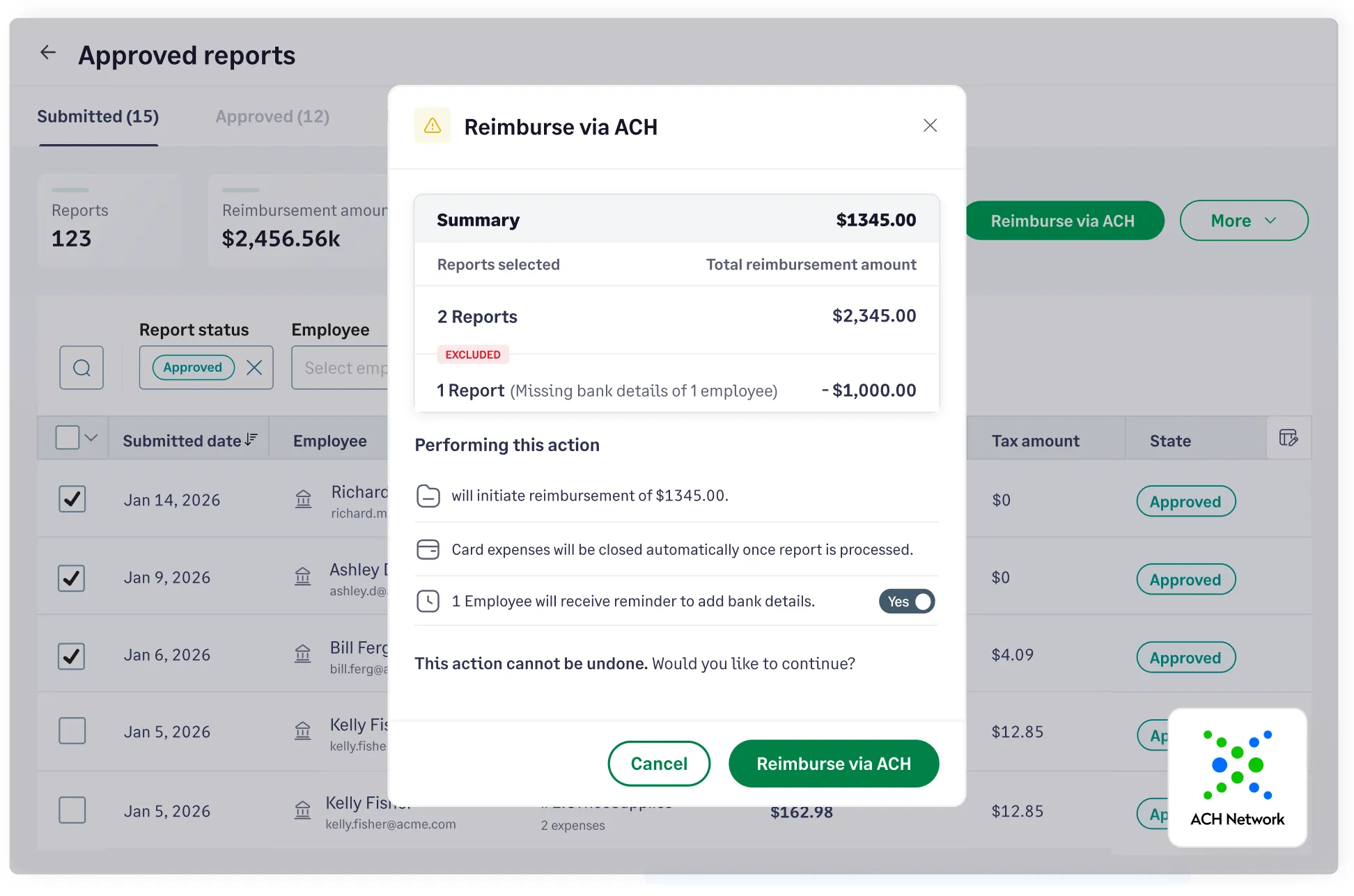
Pay back your team in days, not weeks

Process employee reimbursements faster via Express ACH - expenses up to $1,000 reaching employees in 1–2 business days.

By shrinking the time between 'approved' and 'paid,' you boost employee morale and ensure your financial records stay perfectly balanced and up to date.

ACH reimbursements
Sage Expense Management reimbursement dashboard showing an ACH payment summary

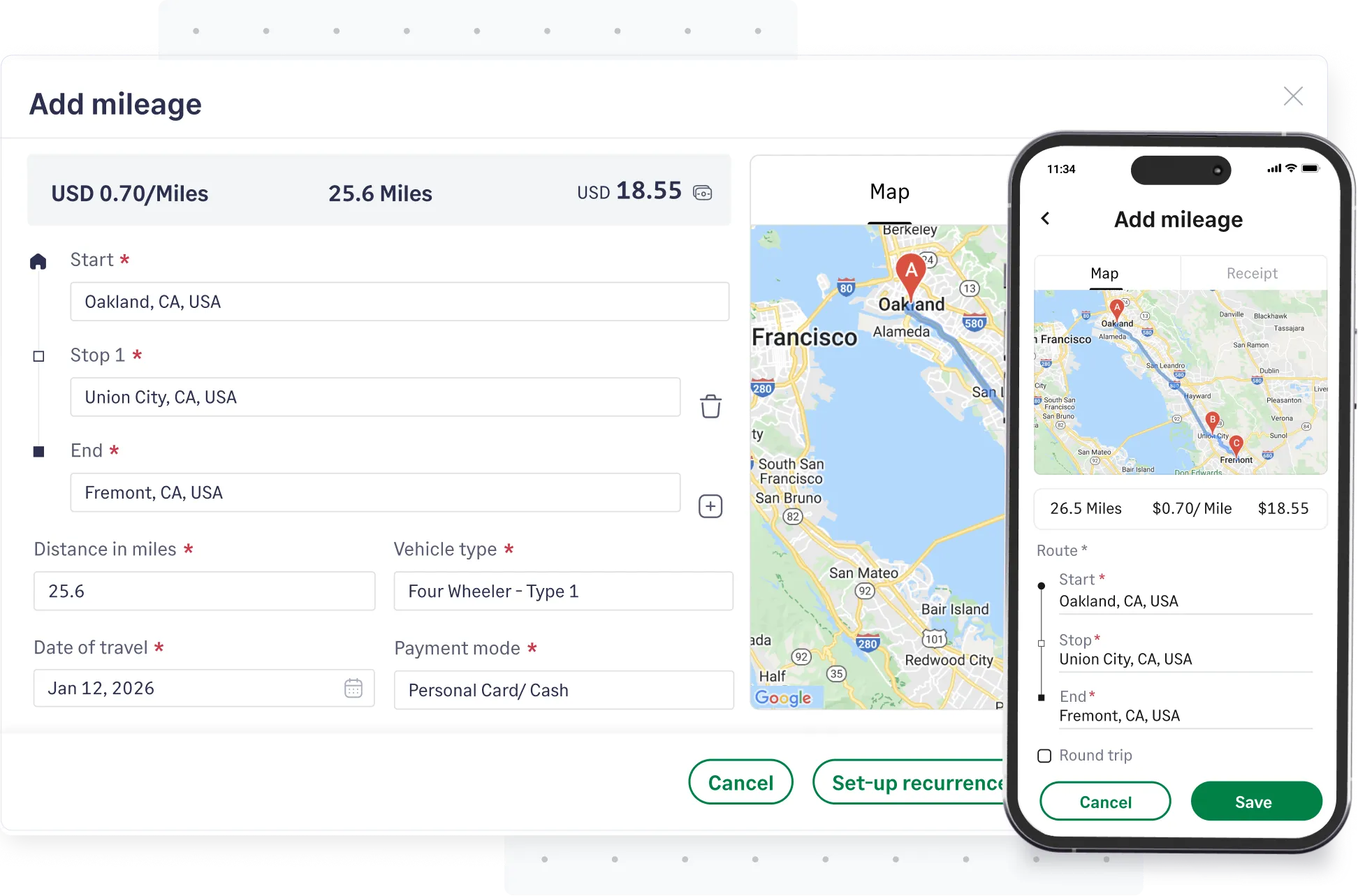
Automated tracking for mileage and per diems

Sage Expense Management integrates with Google Maps to calculate mileage accurately, while per diem rates are applied based on your specific company policy and location.

Employees just enter their route or trip details, and Sage handles the tracking, ensuring 100% accurate, audit-ready submissions every time.

Explore mileage tracking
/assets/images/expense-report/sage-expense-management-mileage-tracking.webp

FAQs around expense report software

Expense reports are detailed records of business-related expenses that employees incur on behalf of the organization. They typically include information such as the date, amount, and purpose of each expense, along with supporting receipts or invoices.

For example, an expense report after an employee business trip can include expenses like transportation, hotel stay, rental car cost, and more. You can download our free expense report template to get started right away.

Creating an expense report can be based on the type of expense, the payee, the specific project or client associated with it, or the employee responsible for the cost.

7 steps to create an expense report for employee expense reimbursements:

  • Step 1: Use a template or an employee expense reporting software to create expense reports
  • Step 2: Determine the reimbursable business expenses to include in your expense report
  • Step 3: Report each business expense as different in-line items in your expense report
  • Step 4: Ensure you fill in all necessary expense fields like date, purpose of expense, merchant, and other payment details
  • Step 5: Calculate the total amount of reimbursable expenses included in your report
  • Step 6: Add relevant notes about the expenses incurred or the overall expense report
  • Step 7: Print and attach expense receipts as proof of spend and then submit them to your reporting manager

Alternatively, you can also use Sage Expense Management, to automate and streamline your expense reporting!
  • Employee name
  • Date of business expense
  • Purpose of business expense
  • Payment method for expense incurred
  • Vendor name
  • Expense category of expense incurred
  • Subtotal and total for all business expenses
  • Approval signature from the reporting manager

Outdated expense reporting methods like manually creating expense reports hinder efficiency and accuracy. A business expense reporting software streamlines the process by extracting all necessary expense report fields, auto-populating it, checking for policy violations or expense fraud, and ensuring all expense claims are compliant.

  • Manual data entry & errors: Employees often spend hours entering expenses into spreadsheets, leading to typos and missing information.
  • Slow approvals & reimbursements: Multiple approvers and paperwork can delay approval and repayment, frustrating employees.
  • Poor visibility & control: Expenses are hard to track in real-time, making it difficult to manage budgets and spot overspending.
  • Time-consuming audits: Paper receipts and scattered data make audits stressful and prone to missing documentation.

An expense reporting software is a tool businesses use to simplify managing employee expense reimbursements and reconciliations. The software enables employees to submit digital expense reports on time, ensures policy compliance, streamlines approval workflows, integrates with accounting systems, and provides insightful data to make better financial decisions.

An expense report software is designed to automate and simplify your entire expense reporting process. The key features to look for are:

  • Expense tracking: Lets you track all business expenses, including mileage, per diems, and credit card spending, in one place and in real-time.
  • Receipt management: Allows you to instantly capture receipt data with a photo from your phone or by forwarding an email, eliminating manual data entry and lost receipts.
  • Credit card integration: The software should also integrate directly with your existing business credit cards - bringing more visibility and control over employee card spend.
  • Policy enforcement: Automatically checks expenses against company rules and flags any violations before they are submitted, ensuring compliance and reducing fraud.
  • Approval workflows: Simplifies the approval process by automatically routing expense reports to the right managers, who can approve them with a single click from anywhere.
  • Reporting and analytics: Provides real-time dashboards and detailed reports on company spending, giving you complete visibility to control budgets and make smarter decisions.
  • Accounting integrations: Seamlessly syncs all expense data with your accounting software (like Sage, NetSuite, QuickBooks, Xero) for a faster, error-free financial close.
  • Mobile access/app: A user-friendly mobile app allows employees to submit and manage expenses on the go, ensuring timely reporting from anywhere.
  • Time savings: Employees can quickly snap receipts and submit expenses with fewer steps, speeding up the entire process.
  • Error reduction: Automated data extraction and built-in validations minimize manual errors and missing information.
  • Faster approvals & reimbursements: Real-time expense submissions and automated workflows mean finance teams can approve and reimburse faster.
  • Policy compliance: Spend limits and policy checks are baked in the system—ensuring expenses stay compliant.
  • Improved visibility & analytics: Finance teams have access to up-to-date data, making it easy to monitor trends, optimize spending, and spot potential issues.
  • Streamlined audits: Digital records eliminate the hassle of hunting for paper receipts, making audits more straightforward.

Sage Expense Management simplifies every step, from receipt tracking to automated credit card reconciliations, and integrates seamlessly with your accounting software. At Sage Expense Management we ensure your teams only focus on what truly matters.

Experience effortless reporting, timely receipts, and total spend visibility

G2 Leader
G2 High Performer
G2 Best Software Satisfaction 2025
G2 Best Software Accounting & Finance 2025
G2 Momentum Leader
G2 Most Implementable
Get a Demo