





Sorry, something went wrong. Can you please try again? Or please send us a note at sales@fylehq.com, and we'll get you started.
With Sage Expense Management (formerly Fyle), collect receipts via text messages as soon as employees swipe their cards. We then match the receipts with card transactions and sync all expense data to your accounting software. Close books on time with our platform.
Sorry, something went wrong. Can you please try again? Or please send us a note at sales@fylehq.com, and we'll get you started.
Zero learning curve for users
Collect receipts 48% faster
Works with your existing business cards
Zero learning curve for users
Collect receipts 48% faster
Works with your existing business cards
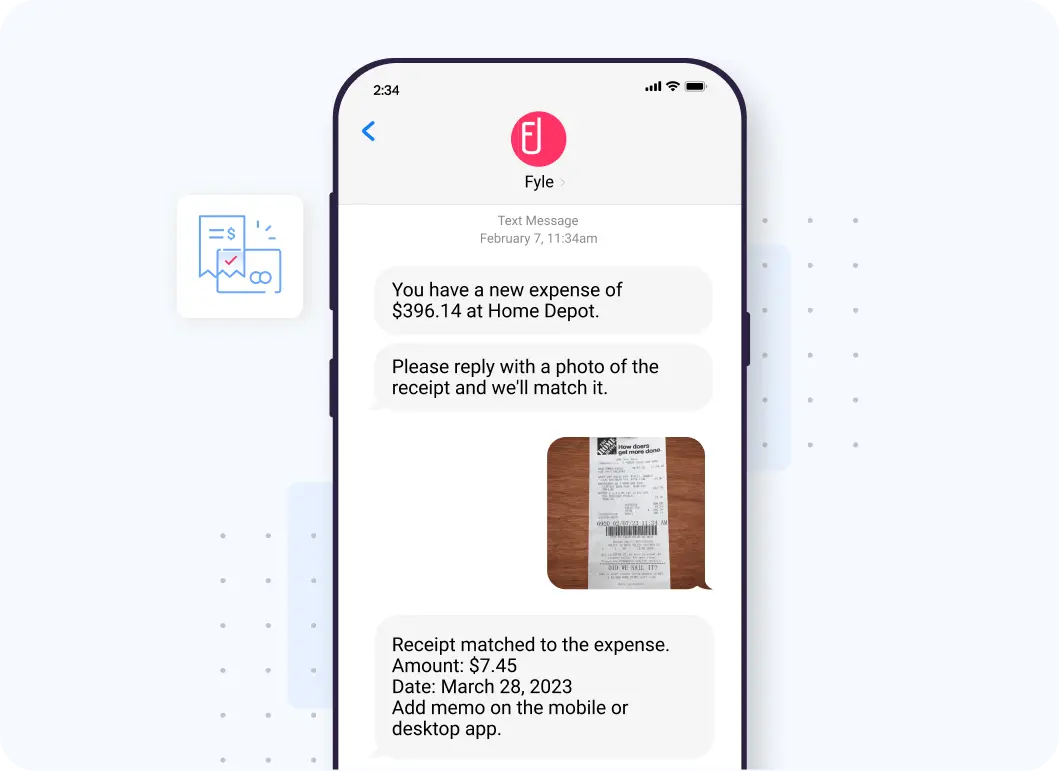
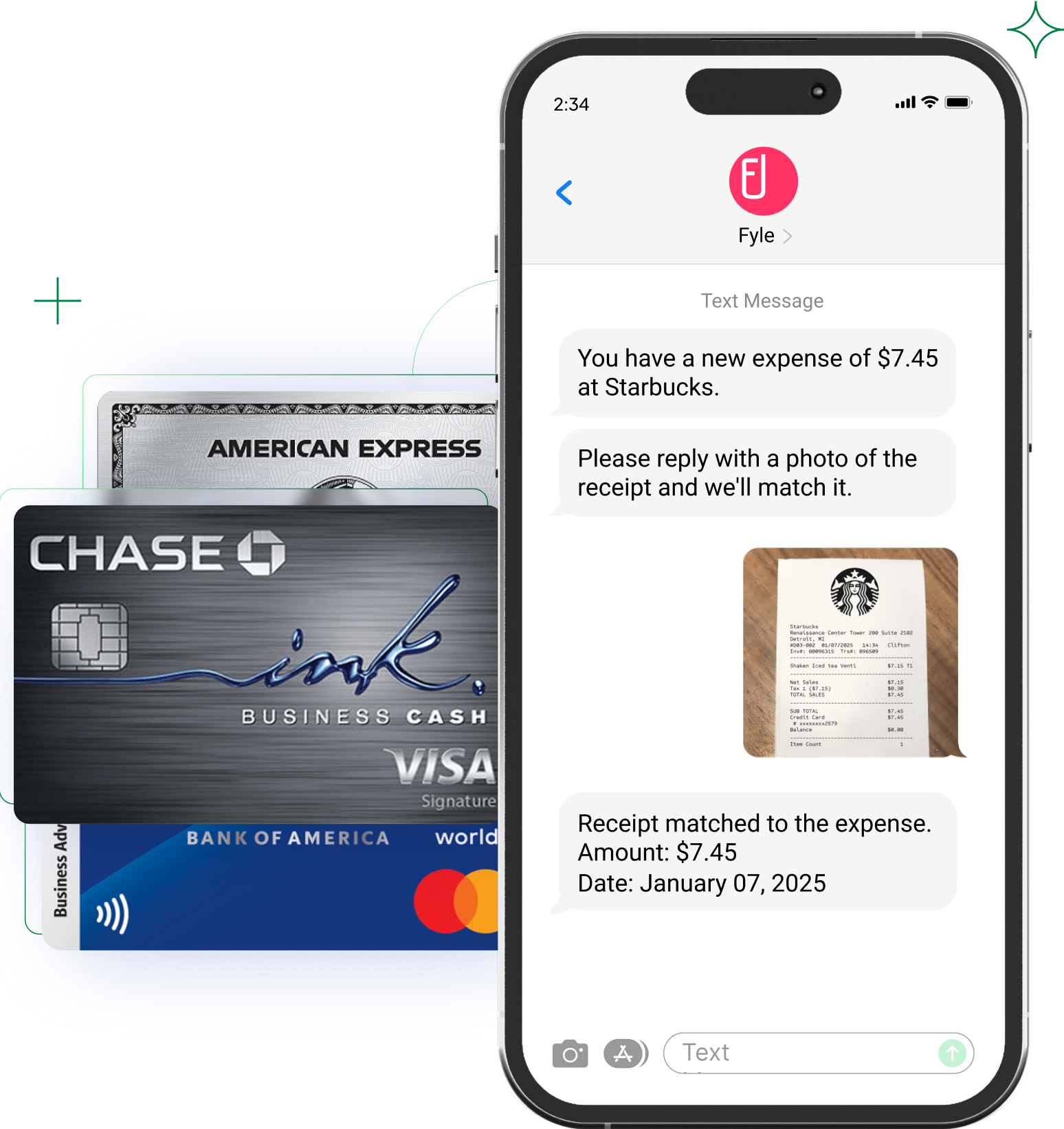
Whenever your employees swipe their credit cards, they get an instant text message notification. They just have to take a picture of the receipt, text it to us, and forget about it. We will instantly extract data, create and code the expense according to GL, match it to a card transaction, and submit it for approval.
Our platform has two-way, self-serve integrations QuickBooks Online, Sage Intacct, and Xero. Automatically sync all your expense data, including receipts, card transactions, GL codes, projects, taxes, and custom fields, in real-time.
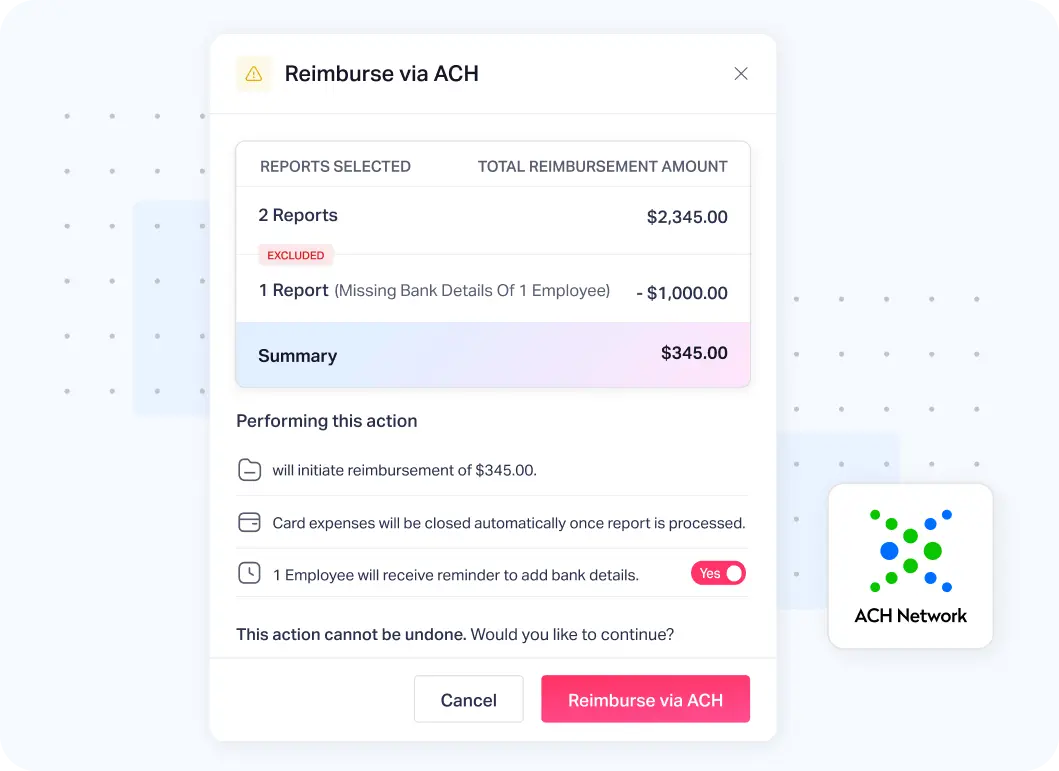
Single-click reimbursement - process reimbursements quickly, track payment status in real-time, and automatically sync data to your accounting software with the platform's ACH (US only) payments.
Connect your business credit cards to Sage Expense Management
Just enter and verify your credit card details, and spend data starts flowing instantly.
Get notified of all card spends, instantly
Get text message notifications for credit card spends. The transactions get reflected on the platform's dashboard instantly.
Collect receipts via text messages
Employees have to simply reply to the text with receipt image. They can also turn in receipts via Gmail, Outlook, Slack, or the mobile app.
Sage Expense Management auto-matches receipts with expenses
When employees respond to the text message notification with a picture of the receipt, the platform automatically matches it to the right card expense.


CONSTRUCTION
Sage Expense Management has made it very convenient for us to see our expenses as soon as employees swipe their cards. We get to know almost right away when employees have missed a receipt with the real-time card feeds, instead of waiting for the bank statement to be uploaded at the end of the week.
Accounts Payable


MEDIA
Sage Expense Management is an exceptional solution that has consistently proven its value. It stands out as a robust and user-friendly platform, meticulously designed to cater to the needs of both employees and finance/accounting professionals alike.
Controller


FINTECH
Switching to Sage Expense Management has truly improved the way we manage our expenses, by saving us a tremendous amount of time that used to be spent manually inputting receipts and reconciling expenses.
Executive Assistant to the CEO


RELIGIOUS INSTITUTIONS
Sage Expense Management has been a game-changer for our team! Before, our team was inconsistent in their expense reporting, and it took hours and days of work for our accountant to manually enter everything in QuickBooks. With Sage Expense Management, our team has had consistency and accountability, our accountant spends far less time entering expenses!
Administration Director


NON PROFITS
Previously, we were trying to track thousands of dollars in credit card expenses and reimbursements across many employees each month with an Excel spreadsheet. It was a nightmare! With the help of Sage Expense Management's wonderful team, we now have a system that has streamlined the process and made it much more professional for all of us at Bright Futures for Youth.
Associate Director


CONSTRUCTION
Sage Expense Management has tremendously cut the preparation and processing time for our 85 cardholders and admins. Finalizing one reporting period for all cards now takes less than a month, compared to over 2 months before. The availability of reports on demand is precious. The simple process and unsurpassed support has led to significant time and cost savings.
Sr. Financial Operations Analyst


NON PROFITS
The main challenge we face with expense reporting is that we currently have a completely manual process, so our goal was to automate expense gathering, tracking, and reporting to make it easier on our team. Sage Expense Management's ability to capture receipts via email or app, automatically categorize and allocate to various credit card utilizations, & affordability made it a great choice for us.
Treasurer


INFRASTRUCTURE
Previously, I had to compile cardholder's reports and distribute them for signature approval manually. This took a considerable amount of time and effort. Now, with Sage Expense Management, we can track expenses with timestamps in a more efficient manner.
Finance Analyst


COMPUTER SOFTWARE
Sage Expense Management works so well for us, it saves us time to reconcile dozens of charges throughout the month and organizes the individual reports coming from each cardholder. It typically takes each cardholder less than an hour each month to complete all necessary transactions to accurately and completely file their expense reports.
Chief Operating Officer


MANUFACTURING
Sage Expense Management offers robust features without requiring company cards, giving us the flexibility we needed without the extra cost or complexity. It is intuitive and user-friendly, and has significantly streamlined our expense management process.
Office Manager
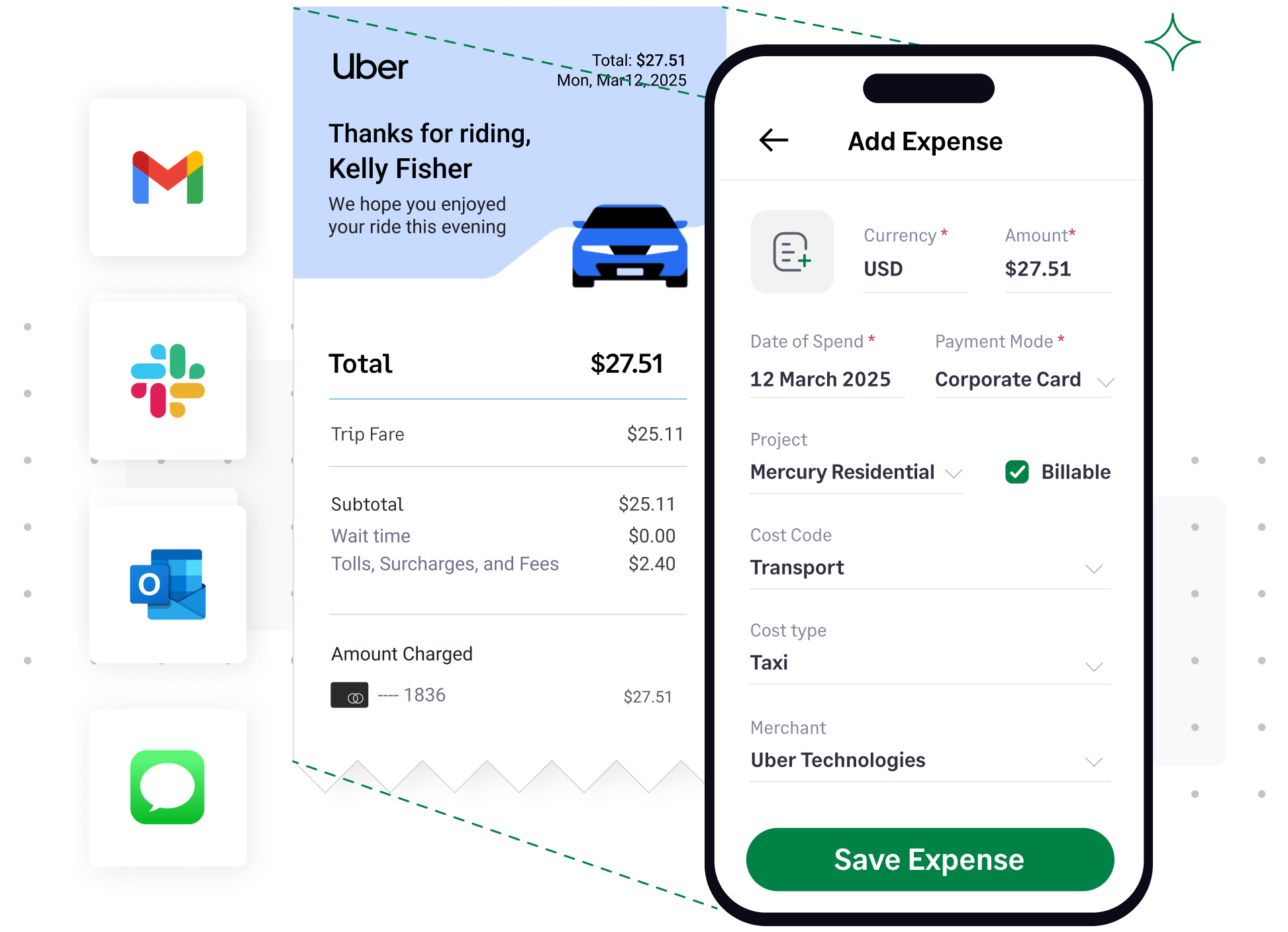

Don't chase after employees for receipts of card transactions
Connect your card to our platform, and get started in <2 minutes
Don't delay your accounting cycle with manual reconciliations
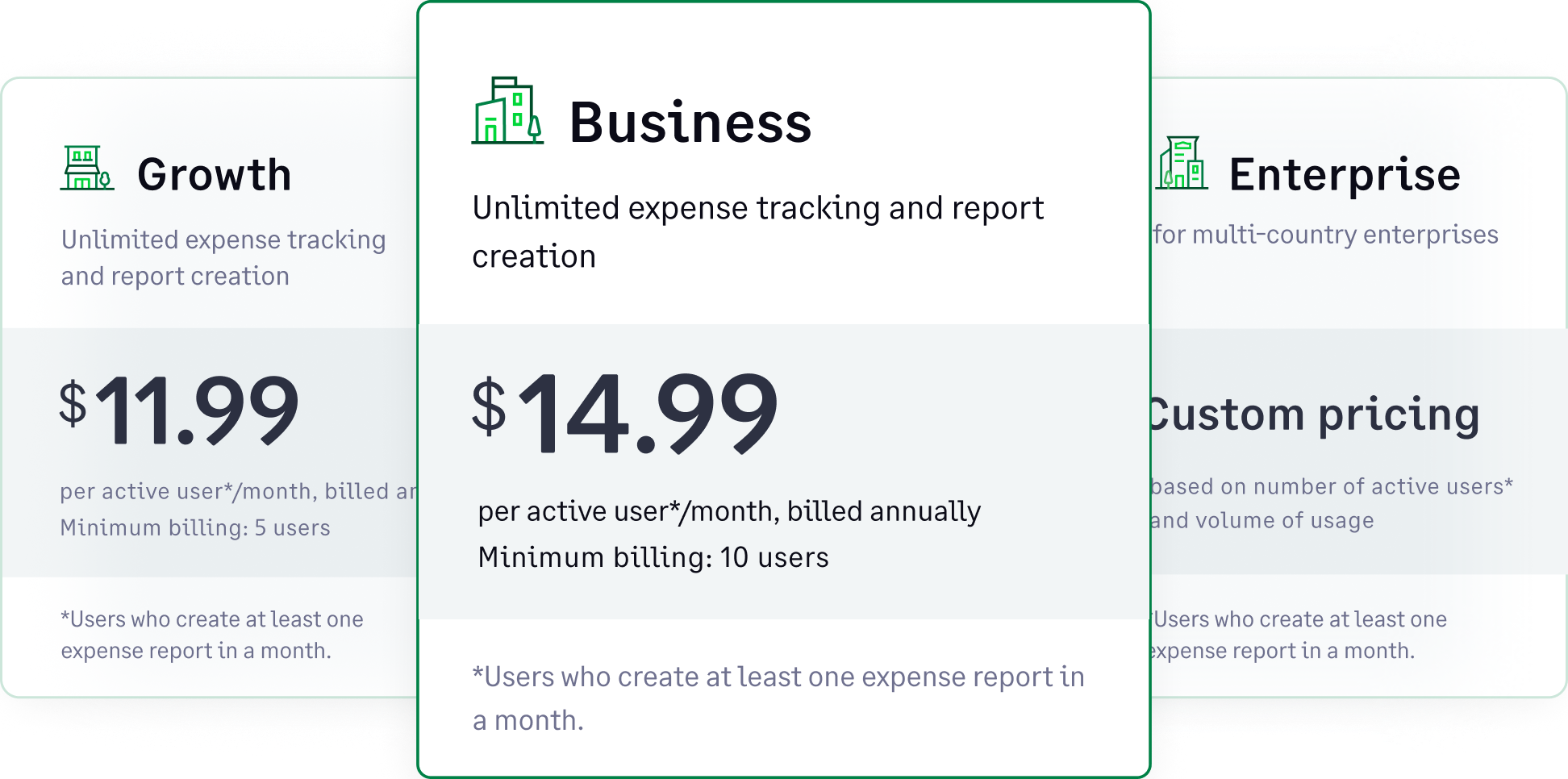
Sage Expense Management only charges you for active users, who create at least one expense report a month.
This busy season - automate credit card reconciliation, increase compliance, reduce risk, and close your books faster with Sage Expense Management.

Set up your account in a couple of weeks. Get 24x7 support with a first response time of under 30 minutes, which is unmatched in the industry.

Sage Expense Management is SOC 2 Type 1, Type 2 & GDPR compliant. We ensure all your account, expense, card, and employee information is secure.

Sage Expense Management only charges you for active users, who create at least one expense report a month.