




You shouldn’t find out about a finance mistake during the audit meeting.
But for many churches, that’s exactly what happens.
A receipt is missing. A ministry overspent its budget. An expense was coded to the wrong fund. Suddenly, you’re scrambling to explain what happened and how it slipped through the cracks.
Whether you’re a bookkeeper, treasurer or executive pastor, you’re doing your best to stay on top of every dollar. But with volunteers and part-time staff relying on paper trails, enforcing expense policies consistently isn’t easy.
That’s exactly where Sage Expense Management steps in. It helps churches catch out-of-policy expenses the moment they happen, not weeks later. This way, instead of reacting under audit pressure, your team can focus on transparency, stewardship, and ministry.
Why Policy Violations Happen in Churches
Church spending often happens outside a structured office and that makes enforcing policies tough.
Most churches operate with multiple ministries, part-time staff, and volunteers who aren’t always familiar with expense processes. Even with the best intentions, minor errors can turn into major compliance headaches.
Here’s why:
- Unclear Rules: Many churches lack a clear, accessible expense policy. Staff may overspend or buy outside their ministry budget without realizing it.
- On-the-Go Purchases: Expenses happen in the field not at a desk. Coffee runs, last-minute bookings, or fuel charges often bypass oversight.
- Lost Receipts: With multiple people involved, receipts get misplaced, making audits difficult and raising compliance risks.
- Training Gaps: Volunteers may not know the correct process, skip approvals, or reuse outdated forms.
- Manual Catch-Up: Without real-time checks, violations are only caught during reconciliation, when it’s too late to fix.
How Sage Expense Management Flags Out-of-Policy Expenses Instantly
Whether it’s a worship leader overspending on supplies or a missing receipt from the youth retreat, policy violations can easily go unnoticed, especially when you’re reviewing expenses weeks later.
With Sage Expense Management, you don’t have to wait until reconciliation to catch issues. Every expense is automatically checked the moment it’s submitted through mobile, email, or web.
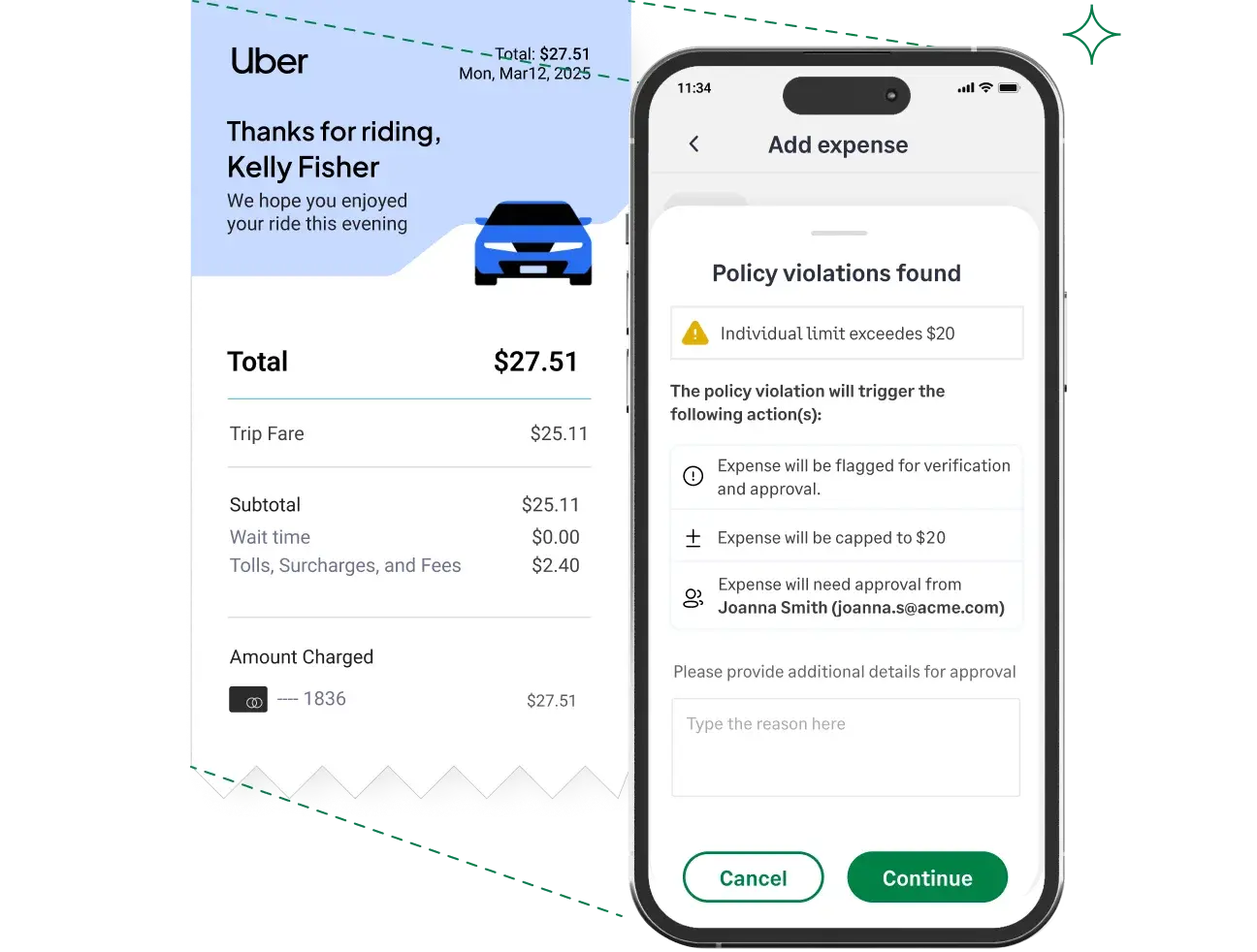
Here’s how it works:
- A staff member or volunteer submits an expense (with or without a receipt).
- Sage automatically reviews each expense against your ministry’s policies, checking for details like receipt attachments, spending limits, and correct tagging.
- If something’s off, the system flags the violation in real time.
- The submitter is shown a clear reason and asked to fix it before it reaches the approver.
- Approvers and finance leaders see the issue highlighted on their dashboard with full context, resolution, and audit trail.
No delays. No missed red flags. No surprises at audit time.
What Kind of Rules Can You Set?
You can configure flexible, layered policies without needing IT or spreadsheets. Examples:
- Spending Limits: “Meals under $50,” “Hotel stays under $150/night”
- Receipt Requirements: “Require receipts for expenses over $25” or “All reimbursements must include receipts”
- Blocked Categories: Flag or entertainment or non-ministry merchants
- Mandatory Tags: Require expenses to be coded by ministry, event or fund
- Submission Time Limits: Disallow expenses submitted more than 30 days after purchase
- Card Match Enforcement: Block expenses that don’t match a church-issued card transaction
Each rule can be:
- Blocking — prevents submission until fixed
- Non-blocking — warns but allows submission
- Applied to specific ministries, roles, or spending types
- Customized with exceptions and justifications
What It Looks Like in Practice
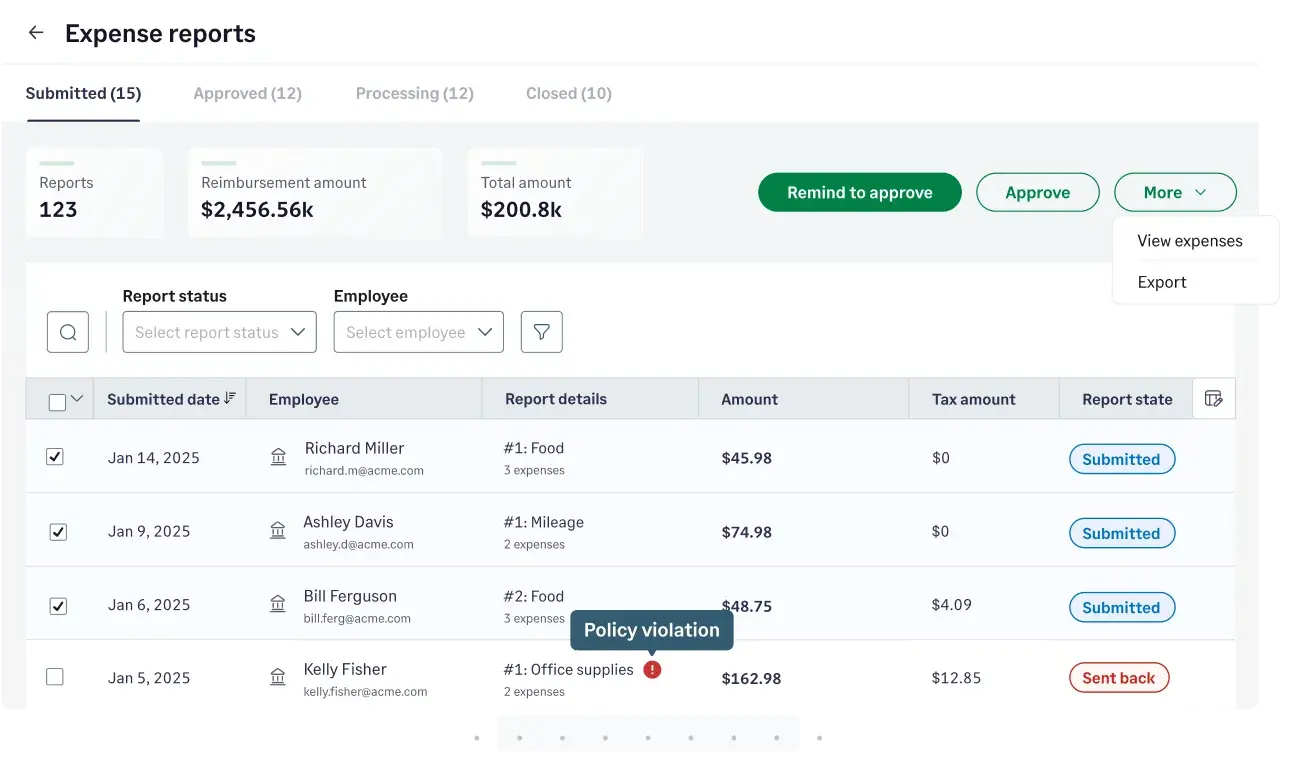
Let’s say your youth ministry director buys $400 worth of supplies for a weekend event but forgets to attach the receipt.
With Sage:
- The system instantly detects that the expense exceeds the $300 limit and is missing documentation.
- A clear message explains the issue and prompts the director to upload the receipt and add a justification.
- The expense is flagged for review with full context for the finance team.
- Approvers see everything in one place, with no back and forth or chasing required.
You get a full audit trail and fewer headaches.
Benefits for Church Finance Teams
- Catch policy issues early – Know right away if an expense goes over budget or is missing a receipt
- Enforce rules automatically – No need to manually review every expense or remind staff of policies
- Give visibility to the right people – Approvers and admins see flagged expenses as soon as they’re submitted
- Save time and reduce back-and-forth – Volunteers can fix issues before anything hits your inbox
- Stay audit-ready and accountable – All violations, justifications, and fixes are tracked in one place
Stay Compliant Without Losing Focus on Ministry
When you’re juggling ministries, donor expectations, and audit responsibilities, even one policy violation can throw things off track. But with Sage Expense Management, your team doesn’t have to guess, backtrack, or chase down errors.
Every expense is checked in real time. Violations are flagged before they reach your inbox, and your team gets cleaner, audit-ready reports without spending hours on manual review.
By automating policy enforcement, you’re not just preventing mistakes. You’re giving your staff and volunteers more time to focus on what truly matters.
{{church-policy-violation="/cta-banners"}}








