




Church finance teams shouldn’t have to spend hours re-entering expenses into accounting software.
But for many churches, that’s still the reality.
Receipts arrive late. Ministry or fund details are missing. Someone exports expenses into a spreadsheet, cleans up the data, and then manually uploads everything into Sage. By the time expenses are posted, the finance team has already lost valuable time and confidence in the numbers.
Sage Expense Management helps churches eliminate this manual work by integrating directly with Sage Intacct and supporting clean, file-based exports to Sage 50. Expenses flow into accounting accurately, consistently, and audit-ready, without rework.
Why Manual Expense Export Creates Headaches for Churches
Even with great accounting software, most churches still manually re-enter expenses. That’s because expense reports often come in with:
- Incomplete or missing fund tags
- Delayed receipts or policy violations
- Reimbursements separate from card spend
- Different file formats than your general ledger
This creates extra cleanup for finance teams and increases the risk of errors before audit or board reviews.
How Sage Expense Management Prepares Expenses Before Accounting
Instead of fixing errors after export, Sage Expense Management helps churches get expenses right before they reach Sage.
Here’s what happens:
- Staff and volunteers submit expenses with receipts attached
- Required fields like ministry, fund, and category must be selected
- Expenses move through the right approvals
- Only complete and approved expenses are ready for accounting
By the time finance exports expenses, the data is already structured and clean.
How Sage Expense Management Helps Churches Using Sage Intacct
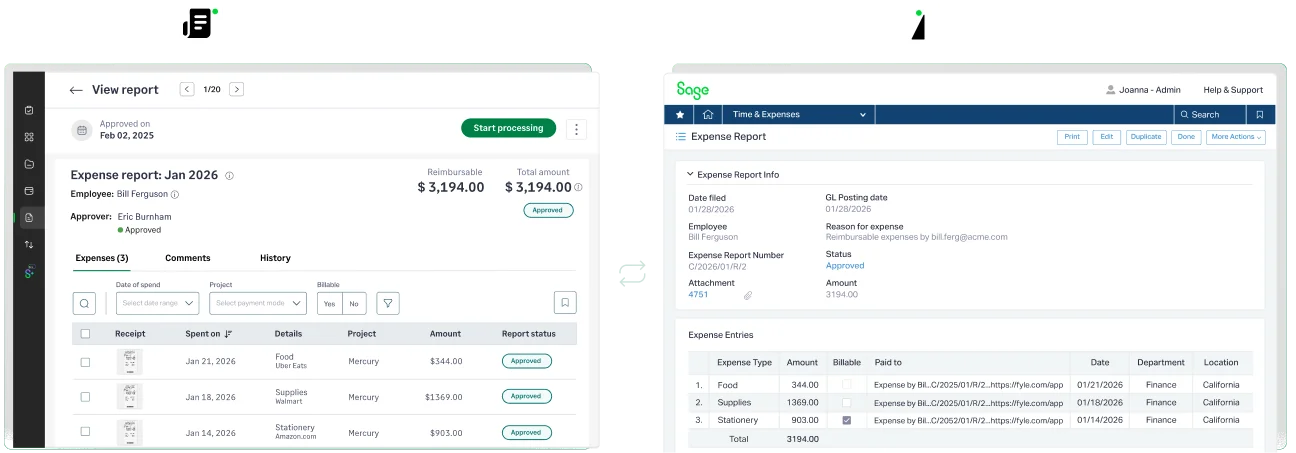
Churches using Sage Intacct often manage complex structures—multiple ministries, funds, locations, and approval layers. Manually pushing expenses into accounting makes that complexity harder to manage.
Sage Expense Management integrates directly with Sage Intacct, allowing church expenses to flow cleanly from submission to accounting without spreadsheets or middleware.
1. Seamless Expense-to-Accounting Flow
Church staff and volunteers can submit expenses through mobile, email, or web. Once approved, expenses sync directly into Sage Intacct—no manual uploads or copy-pasting required.
This means:
- Expenses move from ministry teams to accounting automatically
- Finance teams don’t re-enter or reformat data
- Accounting always reflects approved, documented spend
2. Accurate Ministry and Fund Allocation
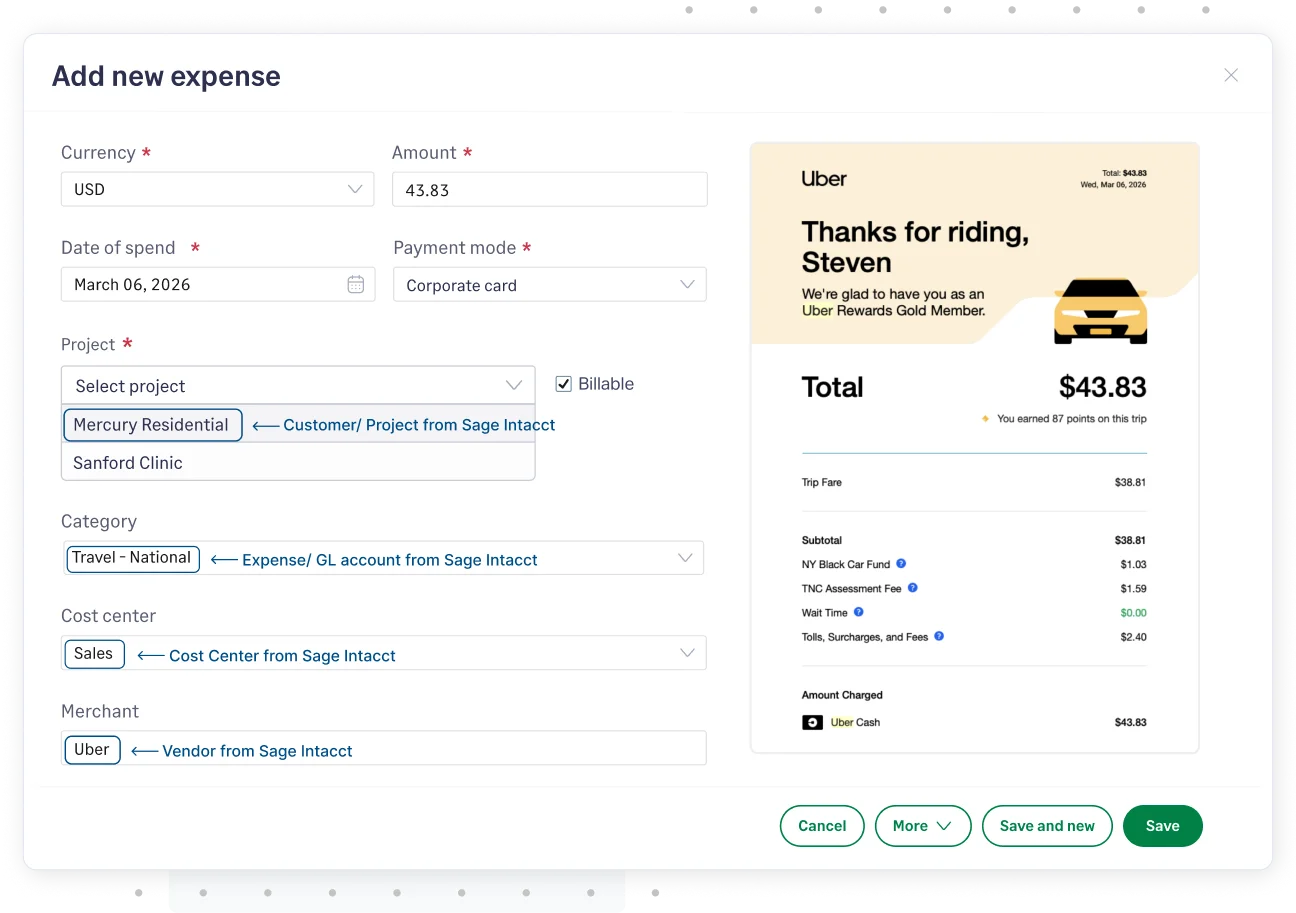
Sage Expense Management pulls dimensions from Sage Intacct, such as:
- Ministries
- Departments
- Locations
- Accounts
Users select from approved dropdowns, ensuring every expense is allocated correctly before it reaches accounting. Finance teams no longer have to fix miscoded entries after export.
3. Clean, Configurable Exports
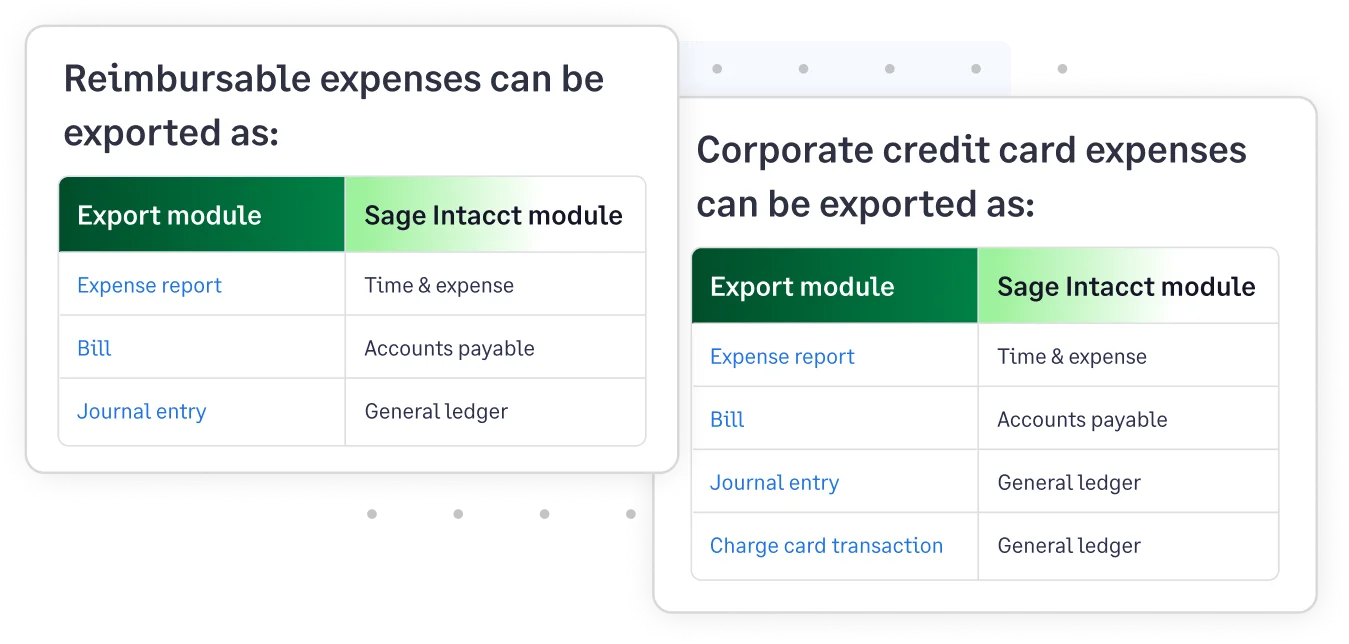
Churches can choose how expenses are sent to Sage Intacct:
- As Journal Entries, Bills, Expense Reports or Charge Card Transactions
- Line-by-line or summarized
- Only after all approvals are complete
You can also skip incomplete or non-approved expenses, ensuring only clean data reaches accounting.
4. Full Audit Trail, Built In
Every exported expense includes:
- Receipts
- Approval history
- Ministry and fund coding
- User notes and justifications
This creates a complete audit trail that’s ready for finance committees and external auditors—without extra prep work.
Result: Church finance teams get clean, reliable accounting data without chasing staff or fixing errors at month-end.
How Sage Expense Management Supports Churches Using Sage 50
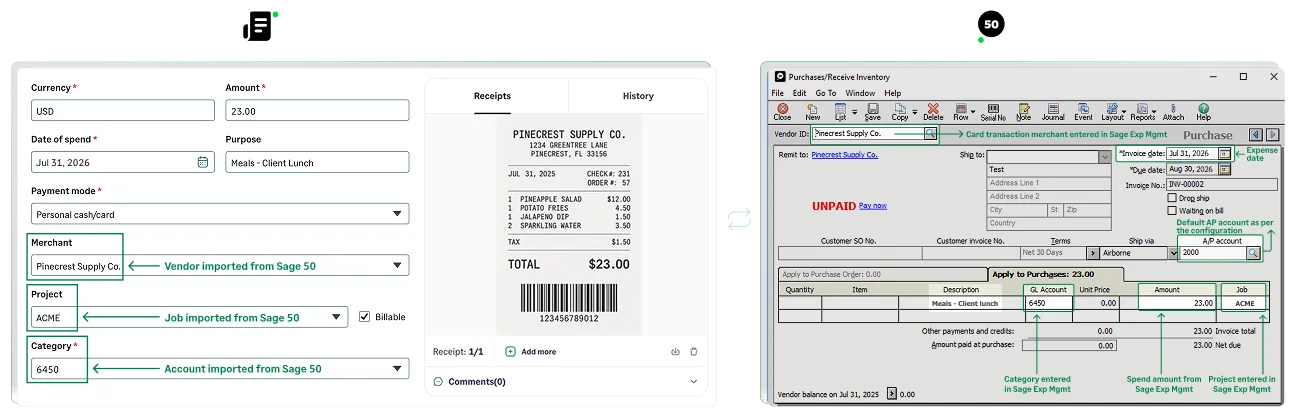
Many churches use Sage 50 as their core accounting system and rely on file-based imports. The challenge is that those files often require manual cleanup before they’re usable.
Sage Expense Management simplifies this process by preparing expenses before export, so files are ready to import into Sage 50 with minimal effort.
1. Structured, Sage-Ready Expense Exports
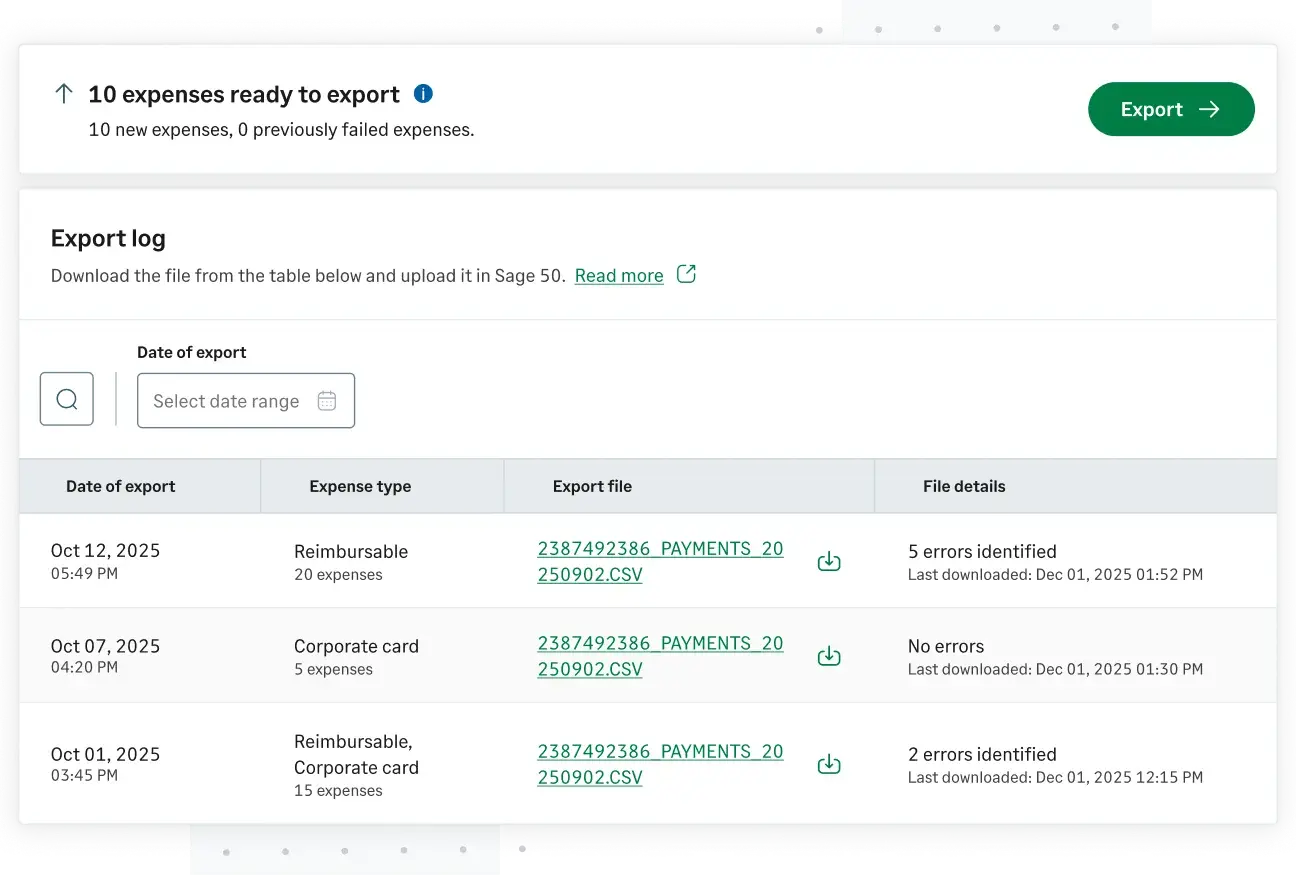
Approved expenses are exported as clean CSV files, already coded with:
- GL accounts
- Vendors
- Expense categories
- Ministry or fund details
Instead of fixing spreadsheets, finance teams download a ready-to-use file and import it into Sage 50 confidently.
2. Controlled Accounting Handoff
Finance teams decide:
- When to export expenses
- Which expenses are included
- What data is sent to Sage 50
This keeps accounting in control while eliminating repetitive admin work.
3. Fewer Errors and Failed Imports
Because coding and validations happen before export:
- Missing fields are caught early
- Errors are flagged before import
- Failed Sage 50 uploads are reduced
Finance teams spend less time troubleshooting and more time reviewing accurate numbers.
4. Works With Existing Church Processes
Churches don’t need to change how Sage 50 works today. Sage Expense Management simply replaces manual expense prep with a cleaner, more reliable workflow.
Result: Churches keep their Sage 50 setup, but eliminate spreadsheet cleanup, re-entry, and month-end stress.
Benefits for Church Finance Teams
- Faster monthly closes with clean, coded, and timely data
- Less manual work and fewer spreadsheet errors
- Accurate allocations by ministry, fund, and account
- Clear visibility into real-time spending
- Stronger accountability for audit season and board reporting
You don’t need IT. You don’t need complex middleware. And you definitely don’t need to chase down receipts or recode “Miscellaneous” line items.
With Sage Expense Management, your church gets the same level of accuracy and speed as a large finance team — without adding complexity.
Clean Accounting Without the Cleanup
Church finance teams already carry a heavy responsibility. Accounting exports shouldn’t add to it.
With Sage Expense Management, expenses are captured correctly, approved properly, and integrated smoothly with Sage Intacct or Sage 50.
No spreadsheets.
No rework.
No last-minute surprises.
{{church-sage-intacct-and-sage-50-integration="/cta-banners"}}








