Missing receipts don’t just cause headaches. They delay reimbursements, frustrate your finance team, and can put your ministry at risk during audits. For churches and chapels, where staff often wear multiple hats and volunteers play a key role in ministry operations, paper-based receipt tracking quickly becomes unmanageable.
We’ve heard this story from churches of all sizes, whether it’s a small chapel or a large ministry. Volunteers hand in crumpled receipts or forget entirely, staff send documents weeks later, and finance admins spend hours piecing together incomplete reports.
That’s where Sage Expense Management helps, offering every pastor, staff member, or volunteer an easy way to submit receipts without needing to log in or learn something new.
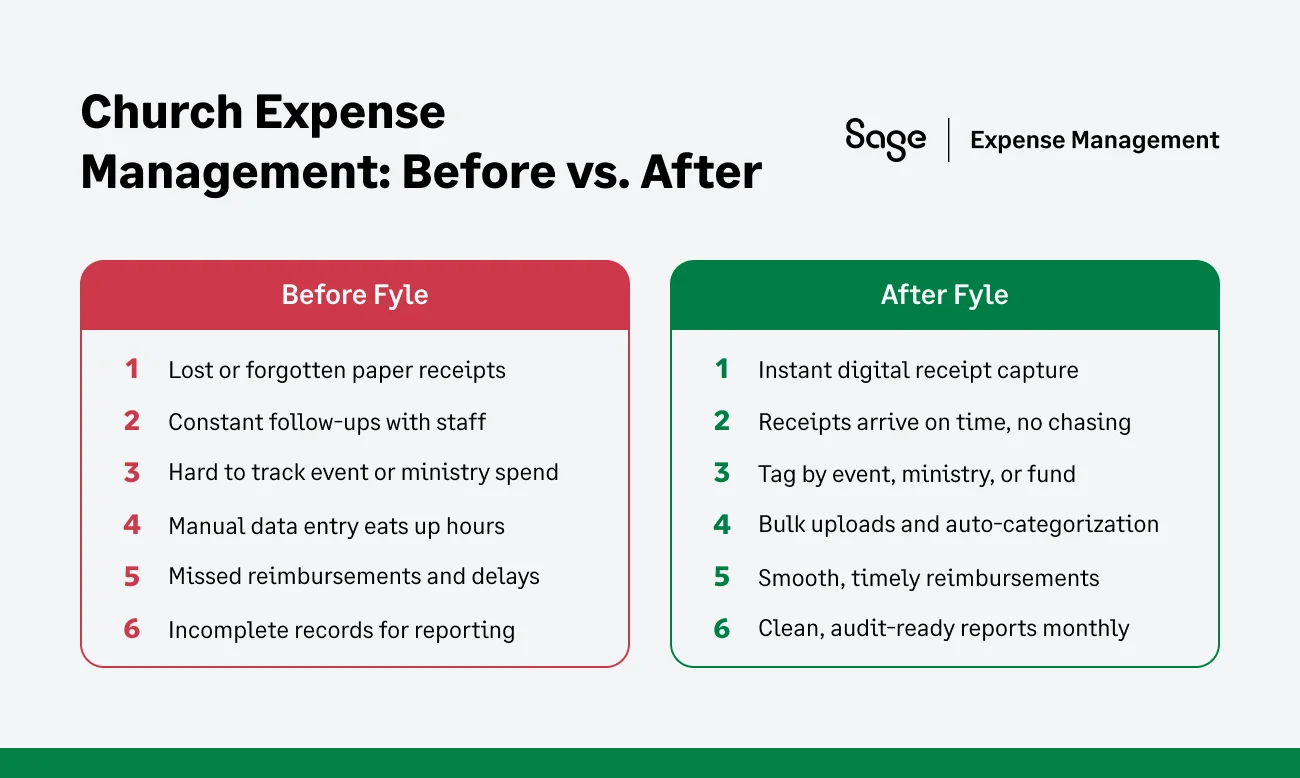
Why Receipt Collection Is So Painful for Churches
- Volunteers and staff forget to submit receipts
Church expenses often happen during youth trips, supply runs, or outreach events, and receipts rarely make it back to the office.
- Digital receipts get buried in inboxes
Hotel bookings, online orders, and software renewals generate e-receipts that are easy to overlook or forward too late.
- Volunteers don’t know the process
With part-time staff and rotating volunteers, it’s hard to keep everyone on the same page without a simple, unified system.
- Month-end reconciliation is exhausting
Finance admins spend hours following up for missing receipts, delaying reimbursements and creating gaps during audits.
How Sage Expense Management Simplifies Receipt Collection for Church Teams
Churches operate differently from businesses, which means your expense software should understand those unique needs. Whether a volunteer picks up supplies for a youth event, a pastor covers coffee for Sunday service, or a finance admin prepares reimbursements for outreach programs, Sage Expense Management makes it easy to collect receipts the moment expenses happen.
1. Submit Receipts Instantly via Text Message (SMS)
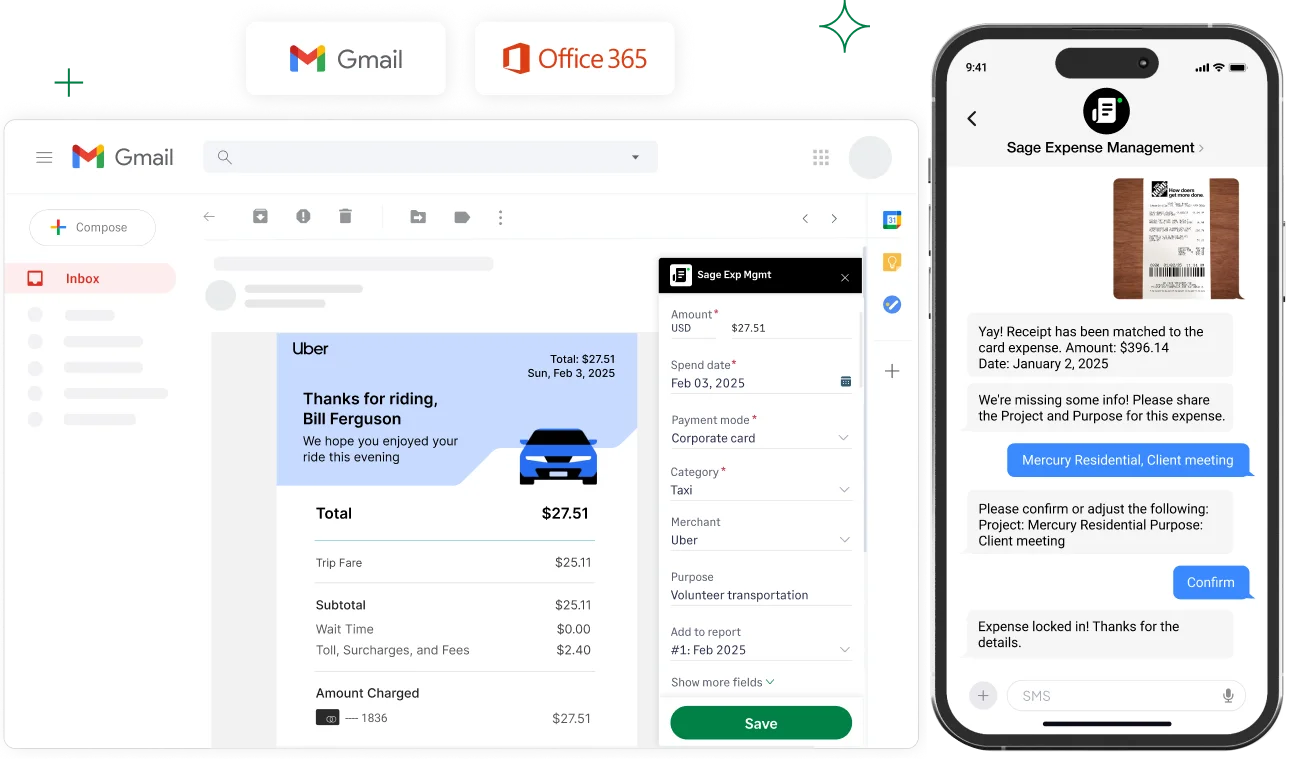
When a volunteer swipes their church card, they instantly receive a text asking for the receipt. All they need to do is reply with a photo, and they’re done.

Once they do, Sage Expense Management automatically:
- Creates the expense
- Matches it to the card transaction
- Extracts the amount, date, and merchant using OCR
This is especially helpful for team members who don’t usually log in to accounting tools.
2. Capture Email Receipts With Gmail and Outlook Add-ins
Whether it’s a hotel stay for a trip or a Zoom renewal, digital receipts are common but often forgotten.
With Sage Expense Management, your team can:
- Use Gmail or Outlook add-ins to scan receipts directly from their inbox
- Automatically generate a draft expense with all key details
- Or forward any e-receipt to [email protected], and Sage Expense Management takes care of the rest
No more manual entry. No more lost emails.
3. Snap Paper Receipts With the Mobile App
For on-the-go purchases like event supplies, snacks, or travel, staff and volunteers can use the Sage Expense Management mobile app (iOS and Android).

With the app, they can:
- Take a photo of a physical receipt
- Tag it to the right ministry, program, or fund
- Let the system extract and auto-fill expense details like merchant, date, and amount
If they have several receipts at once, they can use the Bulk Upload feature to scan everything in one go.
4. Use the Web App for Office Workflows
For admins working from the church office, Sage Expense Management’s web app provides a smooth, centralized workflow.
They can:
- Drag and drop receipts from their desktop
- Enter or verify details as needed
- Submit expenses in just a few clicks

What This Means for Your Church
When submitting receipts is this easy, people actually do it. That means fewer missing documents, faster reconciliations, and smoother audits.
For your finance team:
- No more chasing receipts
- Cleaner records every month
- More time for what matters: ministry
For your volunteers and staff:
- No forgotten receipts
- No extra steps or downloads
- A painless way to stay accountable
Empower Your Ministry With Simpler Processes
Chasing receipts shouldn’t be part of your calling. With Sage Expense Management, churches can move away from paper trails and into a more faithful, streamlined way to manage expenses.
No more late-night email follow-ups. No more folders of missing receipts. Just instant, reliable submissions from any device, by anyone on your team. When your finance process supports your ministry instead of slowing it down, everyone wins.
Let your church spend more time on people and less on paperwork.
{{church-receipt-collection="/cta-banners"}}