




Setting budgets is easy. Staying within them is the real challenge.
Most organizations define budgets at the beginning of the month or quarter, but visibility into actual spending often comes too late.
In many organizations, budgets live in spreadsheets. Finance teams allocate limits by department or project, but visibility into actual spending often comes too late, usually at month end. By the time overages are discovered, the damage is already done.
Modern finance teams need continuous budget visibility, not reactive reporting.
This guide explains how real time expense budgets work in Sage Expense Management, how they update automatically as expenses are recorded, and how finance teams can prevent budget overruns before they impact financial results.
What Is Real Time Expense Budgeting?
Real time expense budgeting connects your expense activity directly to predefined budget limits.
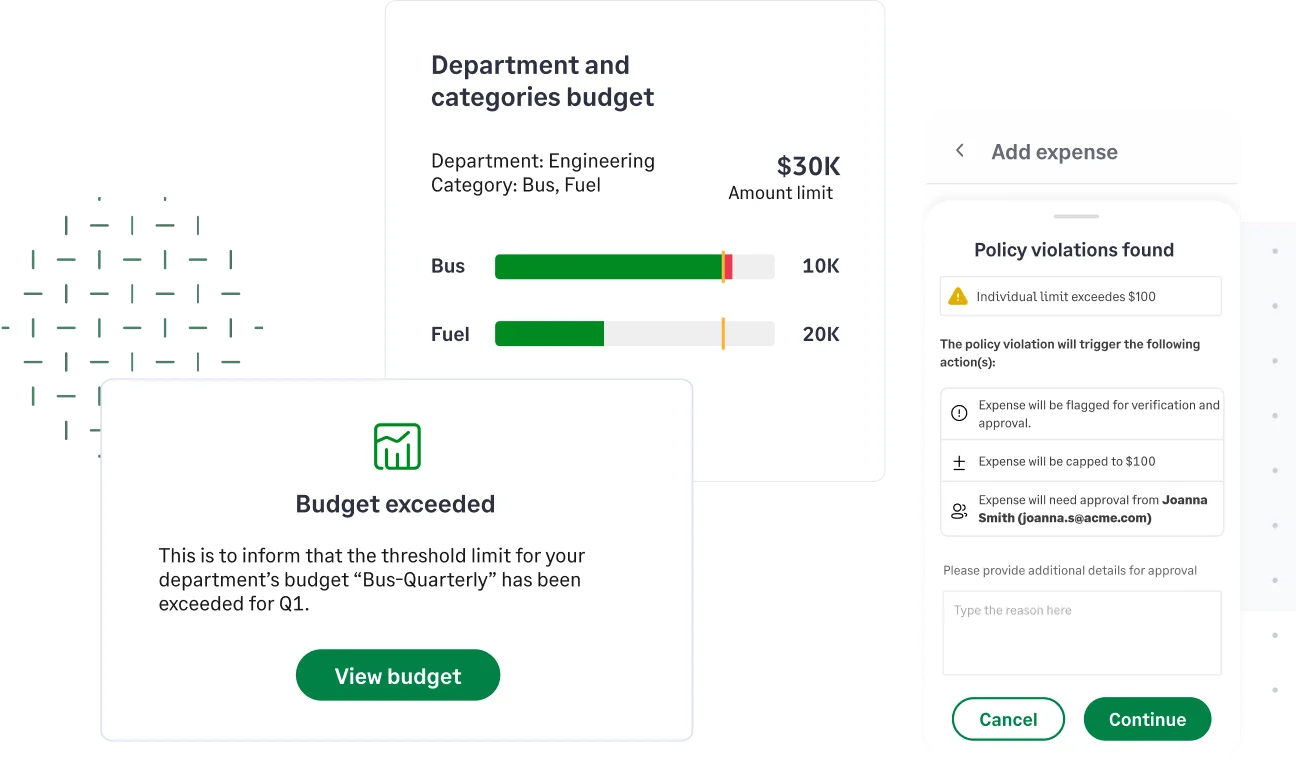
Instead of reviewing budgets after the month closes, spending is tracked continuously as expenses are created and submitted.
With Sage Expense Management, you can:
- Create budgets by department, category, project, or cost center
- Track utilization automatically as expenses are recorded
- Set threshold alerts to get notified before limits are exceeded
- Control who can view budget performance
- Monitor all budgets from a unified dashboard
- Review historical budget usage to improve planning
Budgets update automatically in the background, giving finance teams visibility without manual tracking.
How Budgets Work in Sage Expense Management
Create Budgets That Match How Your Business Operates
Budgets can be configured across multiple dimensions, including:
- Category
- Cost center
- Cost center and category
- Department
- Department and category
- Project
- Project and category
This flexibility allows finance teams to align budgets with how spending is structured inside the organization.
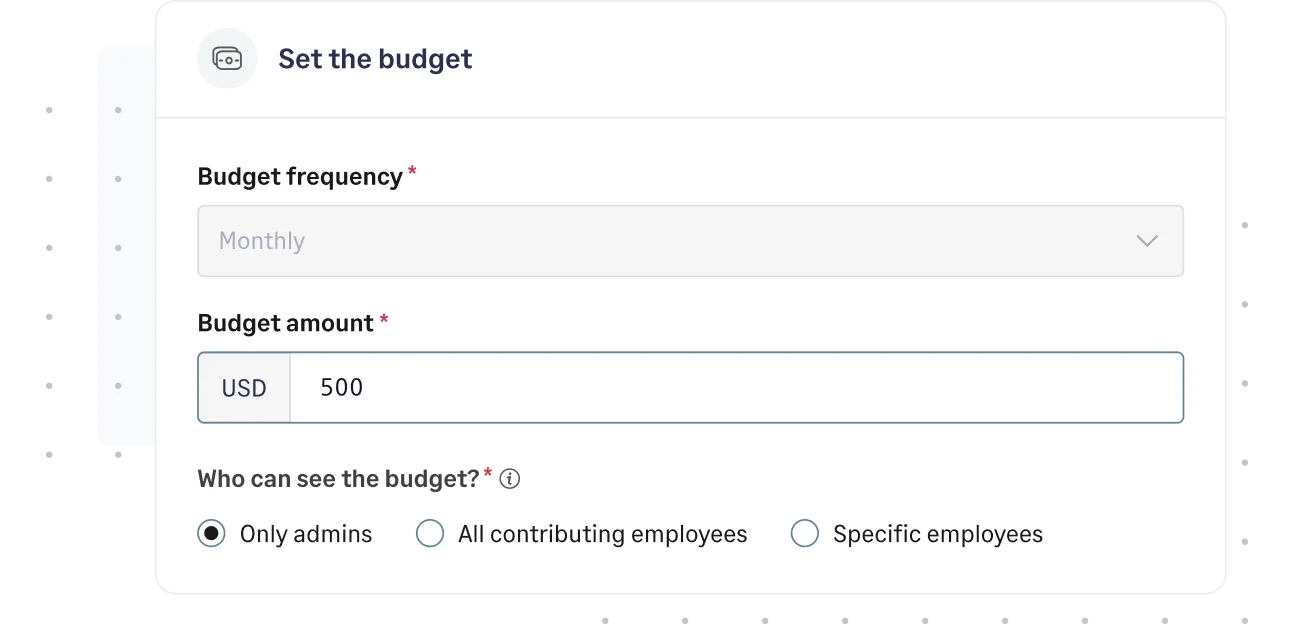
Budgets can be set with different frequencies:
- Monthly
- Quarterly
- Yearly
- One time
At the end of each cycle, budgets reset automatically based on the selected frequency, with no manual adjustments required.
Admins can edit budget details even after setup, ensuring flexibility as business needs evolve.
Budgets Update Automatically as Expenses Are Recorded
Every time an expense is created, whether employee paid or corporate card, it contributes to the relevant budget.
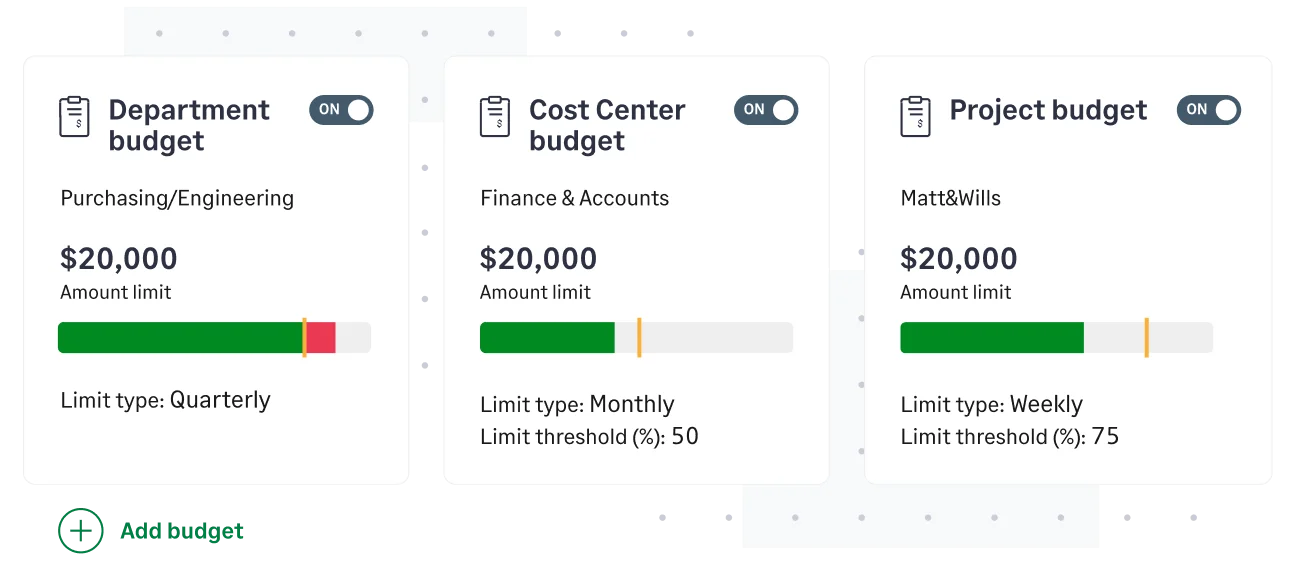
As expenses are submitted and approved, the system automatically updates:
- Total budget limit
- Amount utilized
- Remaining balance
- Utilization percentage
- Budget status (On track, Exceeded, Disabled)
There is no need to manually reconcile spend against a spreadsheet.
Finance teams gain continuous visibility into how much of a budget has been used at any given time.
Make Budgets Visible to the Right People
One of the biggest challenges in budget management is lack of visibility for spenders.
Sage Expense Management allows admins to control who can view each budget:
- Only admins
- All contributing employees
- Specific selected employees
If visibility is enabled for spenders, they can see:
- Total budget amount
- Amount used
- Remaining balance
This visibility helps employees make informed spending decisions before submitting expenses.
Spenders see overall usage only, not detailed expenses from other employees, ensuring transparency without compromising privacy.
Know Before a Budget Is Exceeded
Finance teams can configure threshold alerts to receive notifications when budget utilization approaches a defined percentage.
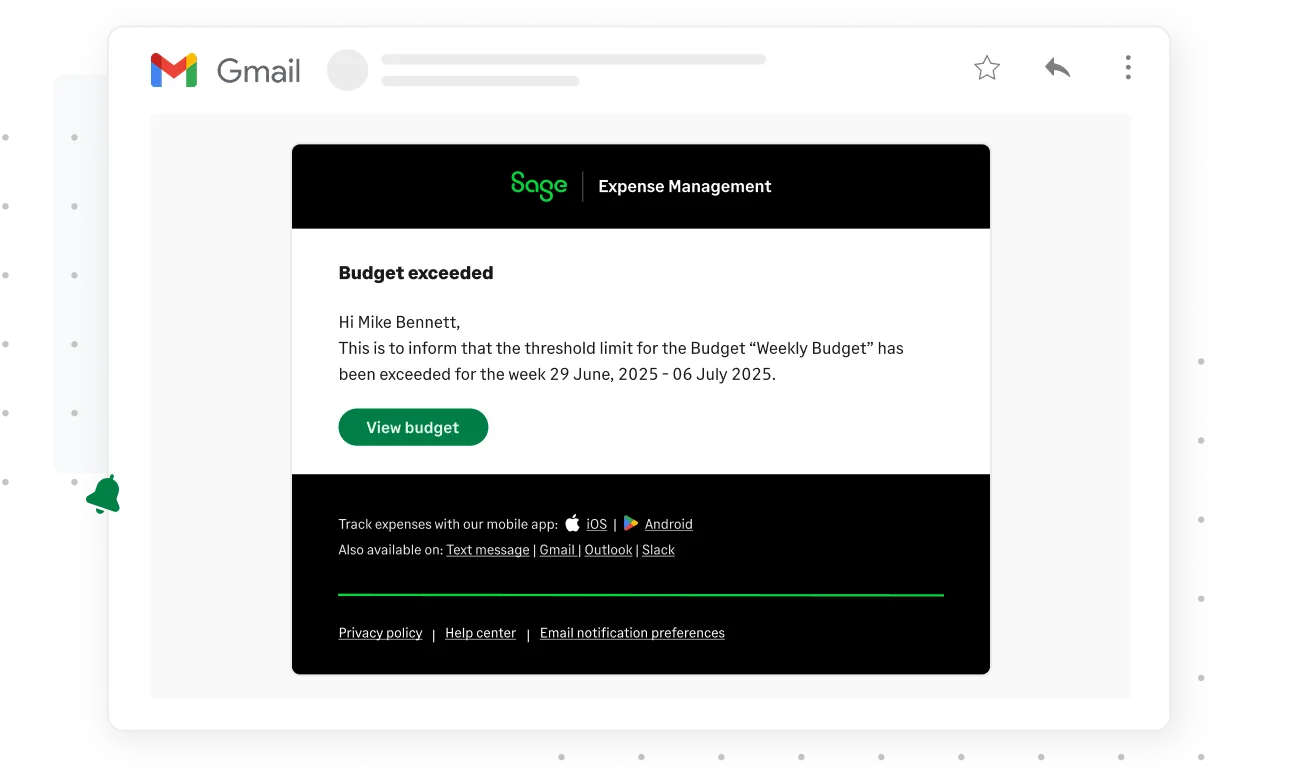
When spend nears or exceeds the limit:
- The budget status updates instantly in the dashboard
- Email notifications are sent to relevant stakeholders
- Overruns remain clearly visible in reporting
Because budgets update continuously, teams don’t have to wait for month-end to discover overspending.
Instead of reacting after limits are crossed, finance can monitor spend in progress.
Track Budget Performance from a Unified Dashboard
The Spend Overview page provides centralized visibility into all budgets across the organization.
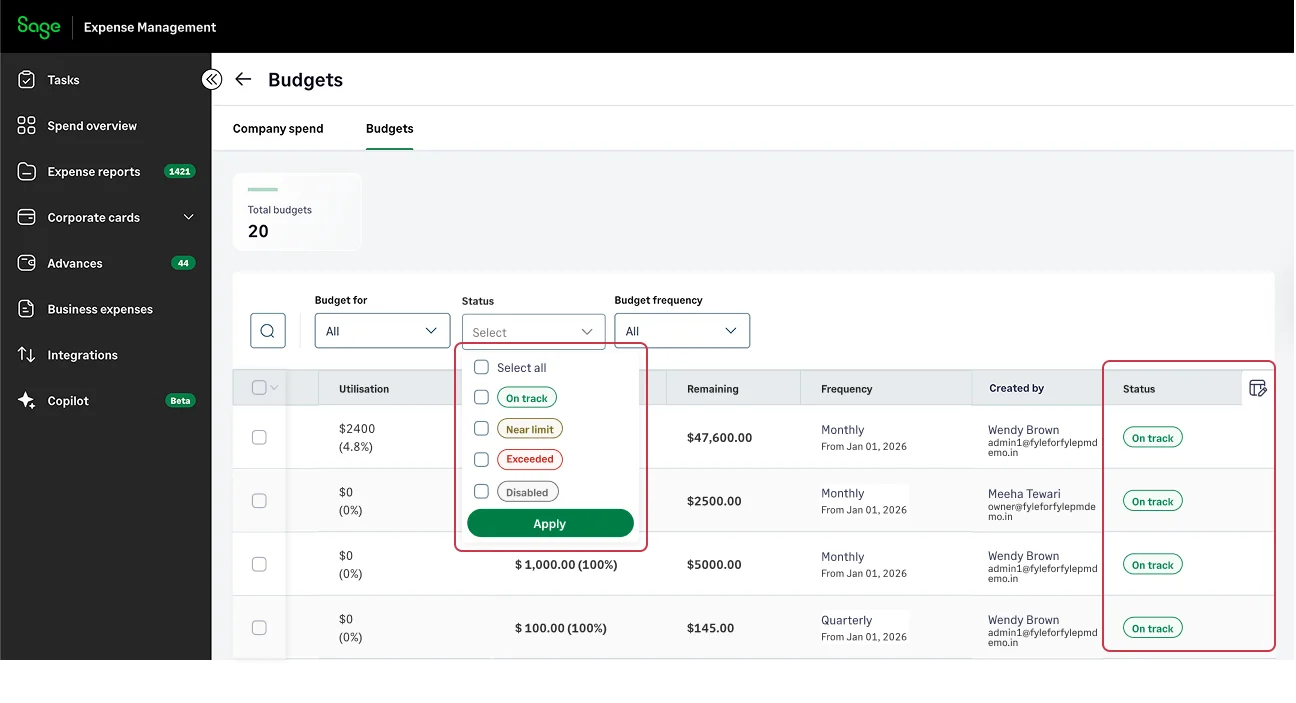
Finance teams can:
- Filter budgets by frequency or status
- View utilization percentage and remaining balance
- Identify budgets nearing limits
- Export budget data for reporting
A clear status column allows quick identification of budgets that are on track or exceeded, helping teams prioritize attention where it is needed.
Review Historical Budget Usage
Effective budgeting requires learning from past trends.
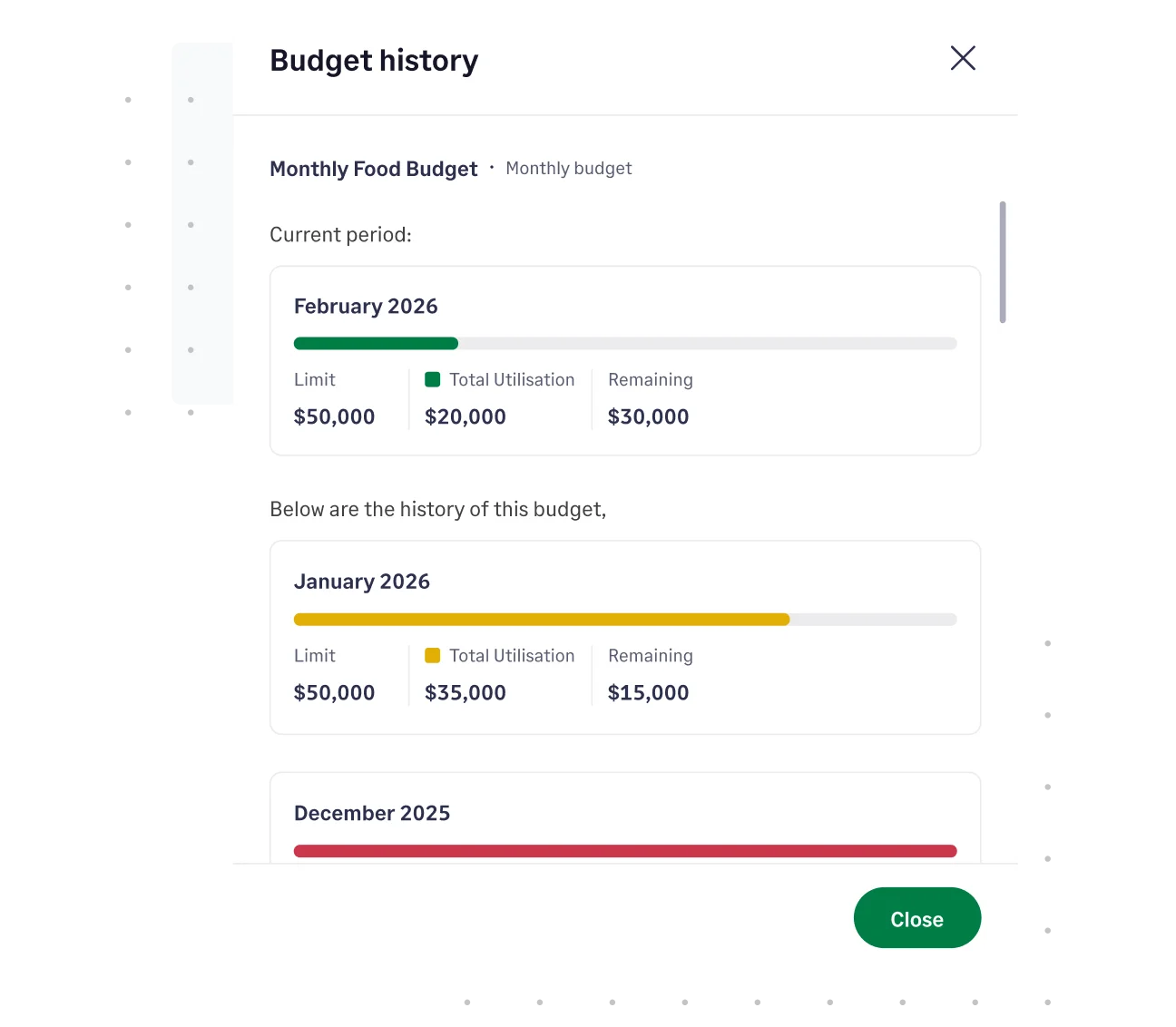
With historical budget tracking, finance teams can:
- View usage from previous cycles
- Compare past and current utilization
- Analyze spending patterns
- Adjust future allocations based on actual data
This transforms budgets from static limits into strategic planning tools.
What Happens When a Budget Is Exceeded?
When spending crosses the defined limit:
- The budget status updates immediately
- The overrun is visible in dashboards
- Notifications alert relevant stakeholders
Budgets themselves do not block expenses. Instead, they provide visibility and alerts that allow teams to take corrective action.
If stricter enforcement is required, budget monitoring can work alongside expense policies to maintain control.
Benefits of Real Time Expense Budgets
For Finance Teams
- Continuous budget monitoring
- Reduced month-end surprises
- Early alerts before overspending escalates
- Improved accountability
- Faster reporting and analysis
For Employees
- Clear visibility into available limits
- Informed spending decisions
- Fewer back-and-forth conversations
For Leadership
- Better forecasting accuracy
- Data-backed allocation decisions
- Controlled growth across departments and projects
{{westhaven-builders-budgets="/quote-banners"}}
From Budget Planning to Real Time Budget Control
Budgets should not exist in isolation from daily expense activity.
By connecting budget limits directly to expense workflows, Sage Expense Management gives finance teams continuous visibility into spending as it happens.
Instead of discovering overruns after month-end, organizations can monitor utilization in real time, alert stakeholders early, and adjust before financial outcomes are impacted.
Budgeting becomes proactive, not reactive.
{{real-time-expense-budgets="/cta-banners"}}








