For most nonprofits, visibility into spending comes too late. You find out someone overspent on a grant after the report is due. You realize receipts are missing only during audits. And you discover policy violations when the month-end close is already in progress.
When expense data is delayed or scattered across spreadsheets, it becomes nearly impossible to track how funds are being used, especially when multiple people, departments, or programs are involved.
That’s where Sage Expense Management helps.
We give nonprofit finance teams real-time visibility into expenses as they happen, not days or weeks later. With instant receipt capture, audit-ready digital records, and built-in analytics, Sage Expense Management helps you stay compliant, stay informed, and stay in control.
Why Visibility Into Spending Is So Hard for Nonprofits
Even with rules in place, most nonprofits struggle with:
- Delayed or missing receipts
- Manual reconciliation of card transactions
- Zero visibility into which programs or grants are overspending
- No centralized dashboard to track expenses or analyze patterns
Most of this comes down to one issue: expense data comes in too late to act on it.
Also read:
How Sage Expense Management (formerly Fyle) Gives You Real-Time Visibility and Control
Sage Expense Management replaces disconnected tools and delayed reports with a single platform that shows you what’s happening as it’s happening. Here’s how.
1. Get Notified the Moment a Card Is Swiped
Sage Expense Management connects directly to your organization’s existing credit cards, including real-time feeds for Visa and Mastercard. So the moment someone swipes their card, Sage Expense Management knows about it.

Here’s how it works:
- Transaction happens: A volunteer uses their credit card for a purchase.
- Instant notification: Sage Expense Management sends them a text message immediately.
- Receipt submission via SMS: They reply with a photo of the receipt—no app or login required.
- It codes and matches the expense: It auto-fills the amount, date, merchant, and receipt into a report.
This means no more chasing receipts or waiting weeks to see what was spent. You get visibility into every expense, right when it happens.

2. Track Every Transaction From One Dashboard
With Sage Expense Management, every expense is tracked in real-time and tagged to the correct program, grant, or budget. Whether it's a card transaction or out-of-pocket reimbursement, everything shows up instantly.

On a single dashboard, you can:
• View receipts and documentation as soon as they’re submitted
• Filter spend by employee, project, department, or fund
• Track approval progress and policy flags
• Catch overspending early by comparing live data against budgets
• Spot missing receipts or delayed submissions
You don’t have to wait until the end of the month to find issues. Sage Expense Management gives you the visibility to act in the moment, helping you avoid compliance risks and stay audit-ready.
3. Stay Audit-Ready With a Digital Audit Trail
With Sage Expense Management, every transaction is logged, every receipt is stored, and every approval is tracked.
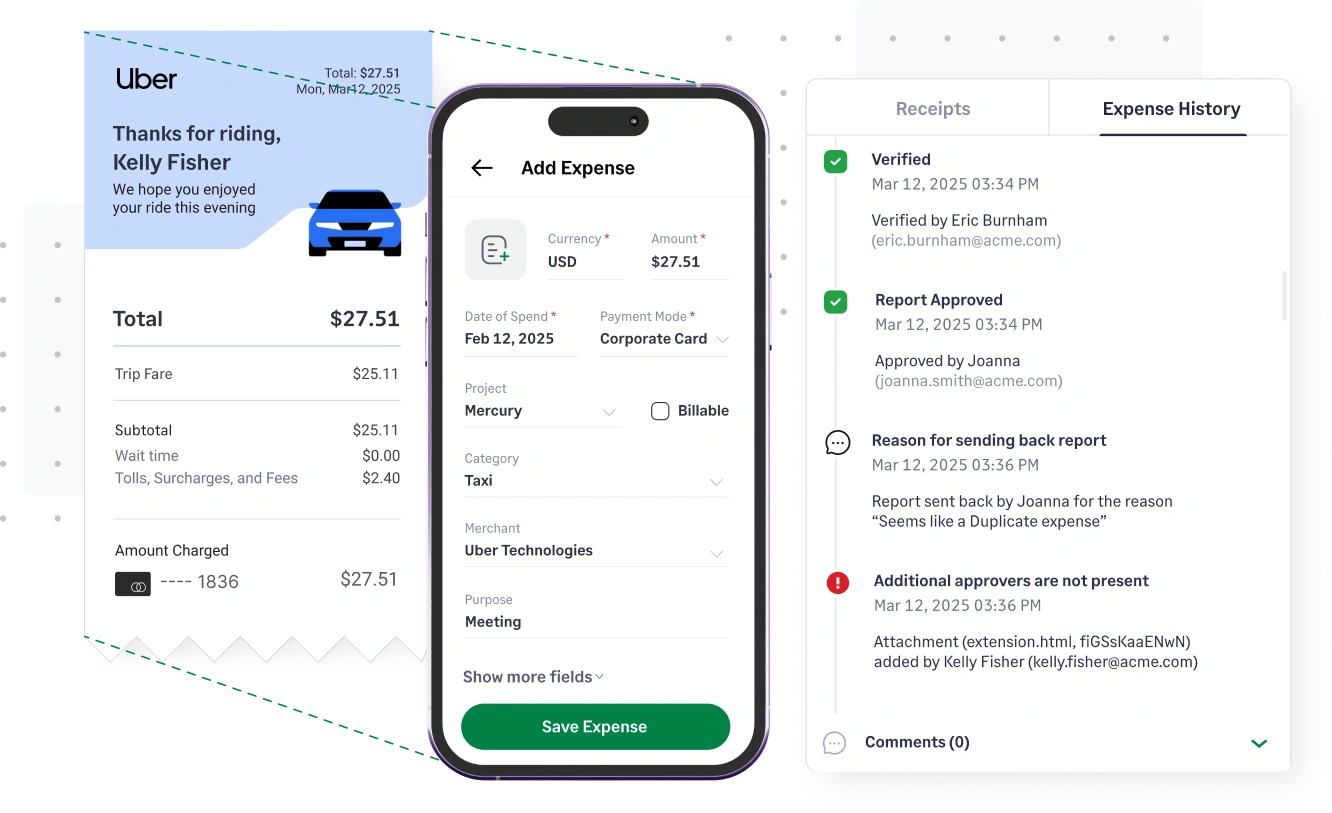
- Receipts are stored digitally with full visibility for admins
- Each action: submission, comment, approval—is recorded
- All expenses are export-ready with proper coding and history
Whether it’s a board review or a grant audit, you’ll always have clean records that prove how every dollar was spent.
4. Use Sage Expense Management Copilot to Analyze Trends and Spot Risks
Sage Expense Management Copilot helps you move from reactive to proactive. It turns your expense data into instant insights without needing to build reports manually.

With Copilot, you can:
- Understand how much was spent on meals across all outreach programs
- Compare current vs. past month’s spending by department
- Spot duplicate expenses or outlier transactions
- Track policy violations, late submissions, or missing receipts
You can ask Copilot questions like:
- “Which grant has the most spend this month?”
- “Show me transactions missing receipts”
- “What are the top vendors by spend?”
So whether you’re preparing for an audit or managing multiple programs, you always have the numbers on your side.

Stay Ahead of Expenses, Not Behind It
When every dollar matters, you can’t afford to wait till month-end to catch errors or explain overspending. Sage Expense Management gives you real-time visibility into every transaction, helps you stay compliant with grant and audit requirements, and turns your expense data into insights you can act on.
No more chasing receipts. No more guesswork. Just the clarity and control your finance team needs to focus on what really matters: your mission.