




An expense report template shifts the entire burden of data entry, verification, and policy enforcement onto your finance team. While it may suffice for a handful of employees, it becomes unmanageable as your team grows.
The result? You aren't managing spend; you're managing paper.
In this guide, we're going to break down the actual cost of manual reporting by comparing it to the cost of automation. We'll compare the lifecycle of a single transaction to show why spreadsheets are mathematically unsustainable for growing organizations.
Why This Comparison Matters Now
The way we work has changed. The old process of collecting paper receipts at the end of the month is obsolete.
- Hybrid teams are distributed, making paper collection a logistical nightmare.
- Corporate card use is exploding, but the manual reconciliation process is a time-consuming data entry task.
- IRS scrutiny is increasing, and a messy folder of spreadsheets and loose PDFs is not an audit-ready system.
Finance teams no longer need a better calculator; they need real-time accuracy and automated compliance. It's time to move from chasing data to analysing it.
The Tale of Two Workflows: A Side-by-Side Comparison
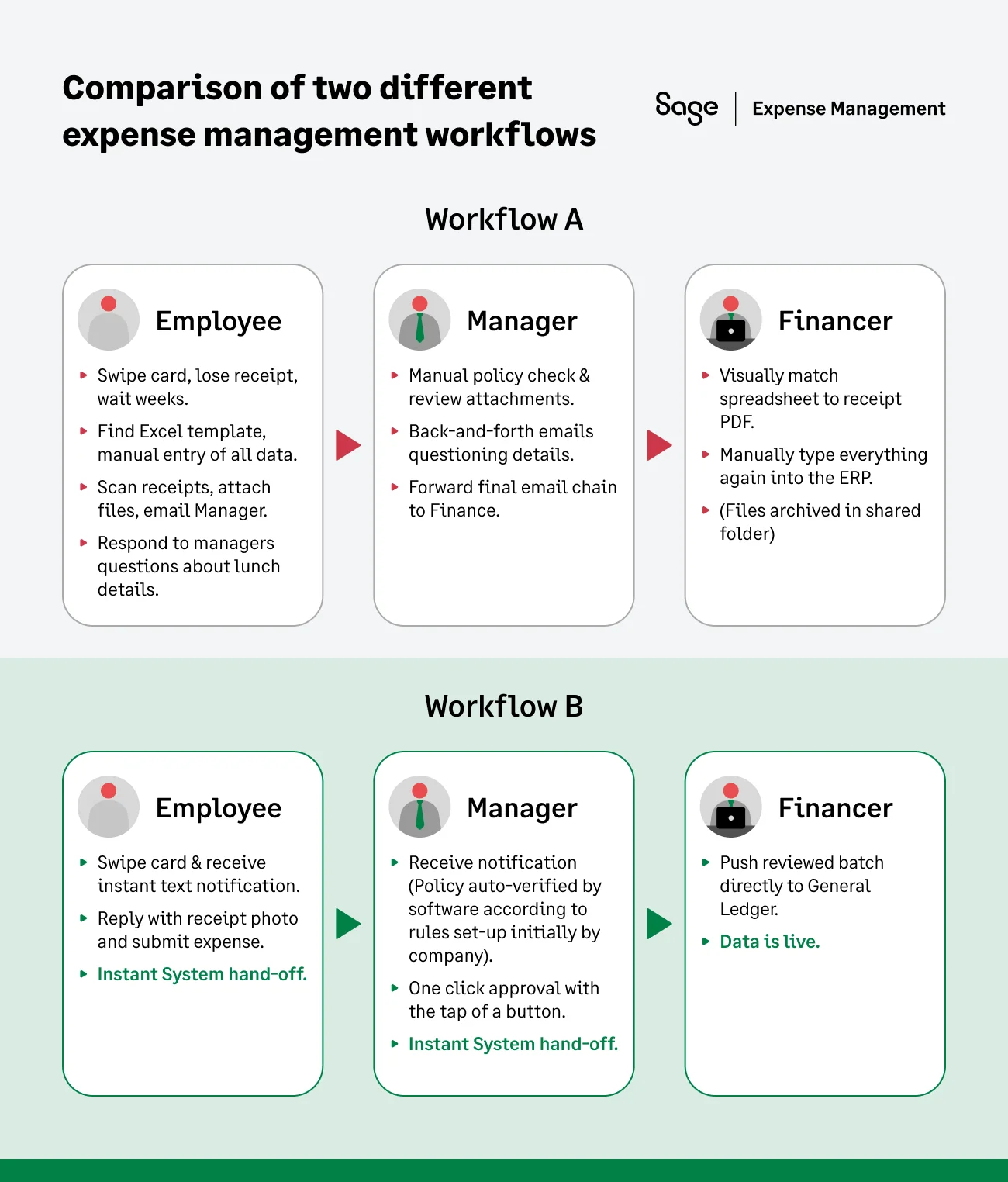
Workflow A: The Expense Report Template (15+ Frustrating Steps)
- Employee: Swipes the card. Puts the paper receipt in their wallet.
- ...Two weeks later, finds the crumpled receipt.
- Logs onto their computer, finds the "Expense_Template_v3_FINAL.xlsx" file.
- Manually types: Date, Merchant ("Joe's Steakhouse"), Amount ($50.00), and a vague "Business Purpose" ("Client Lunch").
- Scans the receipt (or takes a blurry photo).
- Saves the spreadsheet and the image file.
- Attaches both to a new email.
- Sends the email to their manager for approval.
- Manager: Opens the email, downloads the spreadsheet, and opens it.
- Tries to remember the company policy on meal limits.
- Emails the employee back: "Who was at this lunch?"
- Employee emails back: "Oh, it was John from Acme."
- Manager forwards the original email (plus the new reply) to the finance team.
- Finance: Receives the email chain. Downloads the spreadsheet and the receipt.
- Opens both files and manually verifies that the $50 in the spreadsheet matches the $50 on the receipt.
- Logs into the ERP (QuickBooks, Sage Intacct, etc.).
- Manually re-keys all the data: Date, Vendor, Amount, GL Code, Department, etc.
- Saves the PDF receipt and the Excel file into a shared drive folder, hoping the naming convention is correct.
Workflow B: An Automation Software (4 Simple Steps)
- Employee: Swipes the card. Instantly receives a text notification.
- Replies to the text with a snapshot of the receipt. (Done).
- Manager: Receives a single mobile notification. Clicks "Approve" (the system already verified the expense was within policy).
- Finance: Reviews a pre-reconciled batch of approved expenses and clicks one button to sync all data directly into the General Ledger.
What happens behind the scenes is the most important part. The expense report template workflow is fragmented, reactive, and 100% human dependent.
The automated workflow is integrated, proactive, and system-driven, with policy guardrails, continuous reconciliation, and perfect digital traceability.
The Hidden Costs of the Free Expense Report Template
That free expense report template is actively costing your company money. When you build your business case, these are the four costs you must quantify.
The Time Cost
Industry data shows it takes:
- An average of 20 minutes to process a single manual expense report, with an average cost of $110 per report when labor, errors, and correction time are factored in.
- For a 50-person team submitting one report a month, that's over 25 hours of skilled finance and employee time lost to administrative data entry.
The Error Cost
Manual data entry is a breeding ground for errors. Research shows nearly 1 in 5 manual expense reports contain errors. A single typo in a GL code or a misplaced decimal can force your team to spend hours in month-end reconciliation, hunting down a tiny discrepancy.
The Lag Cost (Visibility Loss)
Templates only show you historical data. You see the spend weeks after it happens, creating a blind spot where you cannot manage budgets in real-time. Additionally, manual verification slows down the entire reimbursement cycle, frustrating employees who are waiting for their money.
The Fraud & Risk Cost
A spreadsheet can't tell you if a receipt is a duplicate. It can't flag that a $150 client meal was a personal dinner on a Saturday. Your tired approver is the only thing standing between an oops and real, undetected fraud.
The IRS Cost You Didn’t See Coming
This is the biggest liability. Templates often miss the key substantiation fields the IRS demands (like Business Purpose). Under IRS Publication 535, expenses without full, adequate documentation can be disallowed as deductions during an audit.
{{waste-of-time-and-money="/cta-banners"}}
Why Automation is the Better Alternative?
The hidden costs of manual expense reporting aren't just minor annoyances; they are structural weaknesses that compound as your company grows.
The fundamental flaw of the expense report template is that it assumes every employee will remember every receipt, understand every policy nuance, and type every data point correctly. But employees are busy, policies are complex, and manual data entry is inherently error prone.
Automation solves this by shifting the burden of compliance from people to a platform. You aren't just adopting an expense management software; you are building a scalable financial operating system that turns a chaotic, month-end sprint into a controlled, continuous workflow.
How Sage Expense Management Helps
Sage Expense Management is designed to directly replace the manual workflow and solve its core problems.
Real-Time Credit Card Feeds
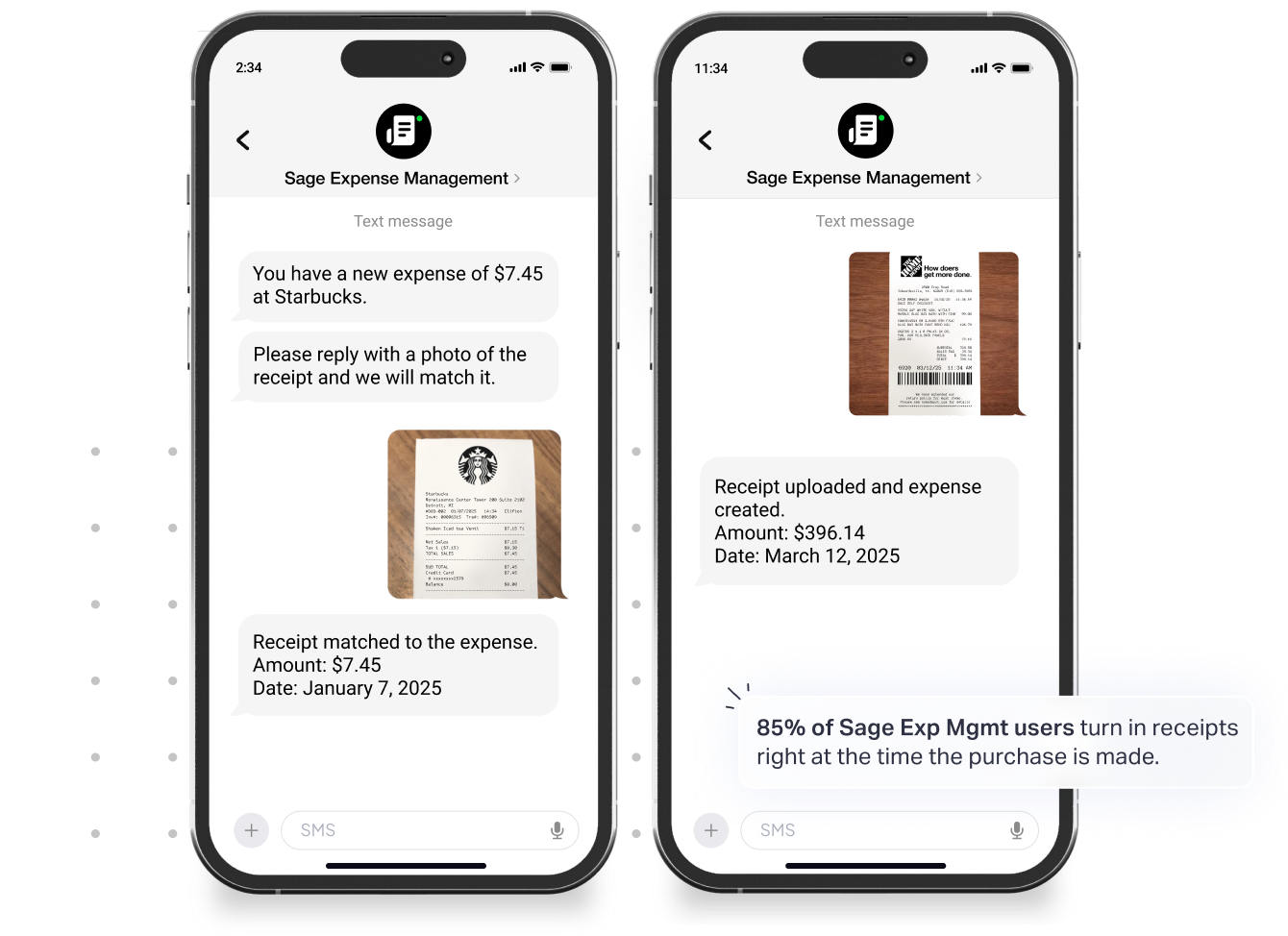
Sage Expense Management has a direct, real-time integration with all major credit card networks. The moment an employee uses their corporate card, they are instantly prompted via text message to submit receipts.
The system does the reconciliation for you, automatically matching the receipt to the transaction. This way, you no longer must wait 30 days to see what was spent. You can see your company's cash outflow and budget status in real-time.
Automated Receipt Capture
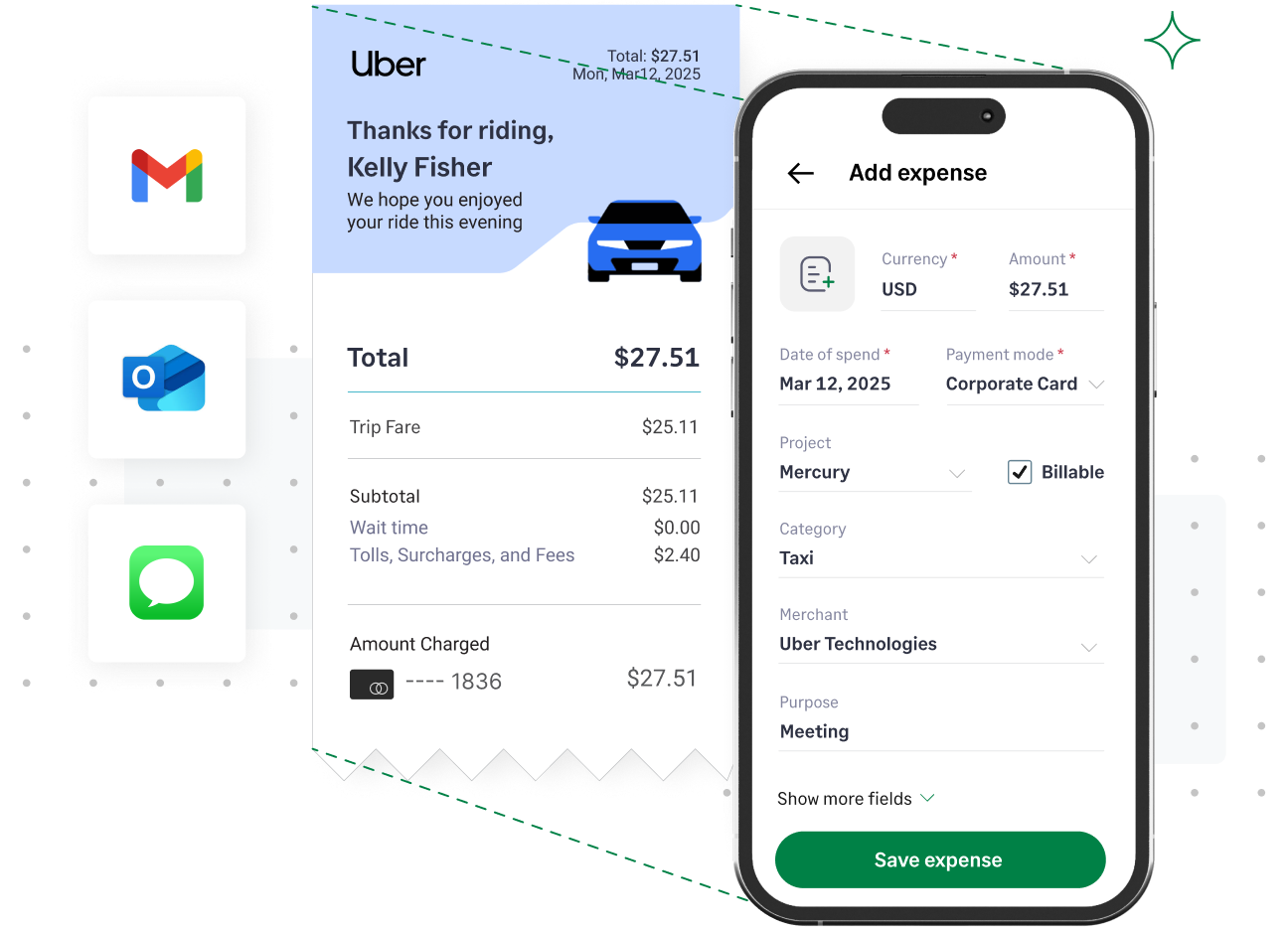
Employees can submit receipts instantly in multiple ways such as email forwards, text message, or our mobile app, and the AI-powered OCR (Optical Character Recognition) instantly reads the merchant, date, and amount.
This ends the endless receipt chase. It stops employees from hoarding a wallet full of crumpled receipts to submit at month-end.
Automated Policy & Compliance Engine
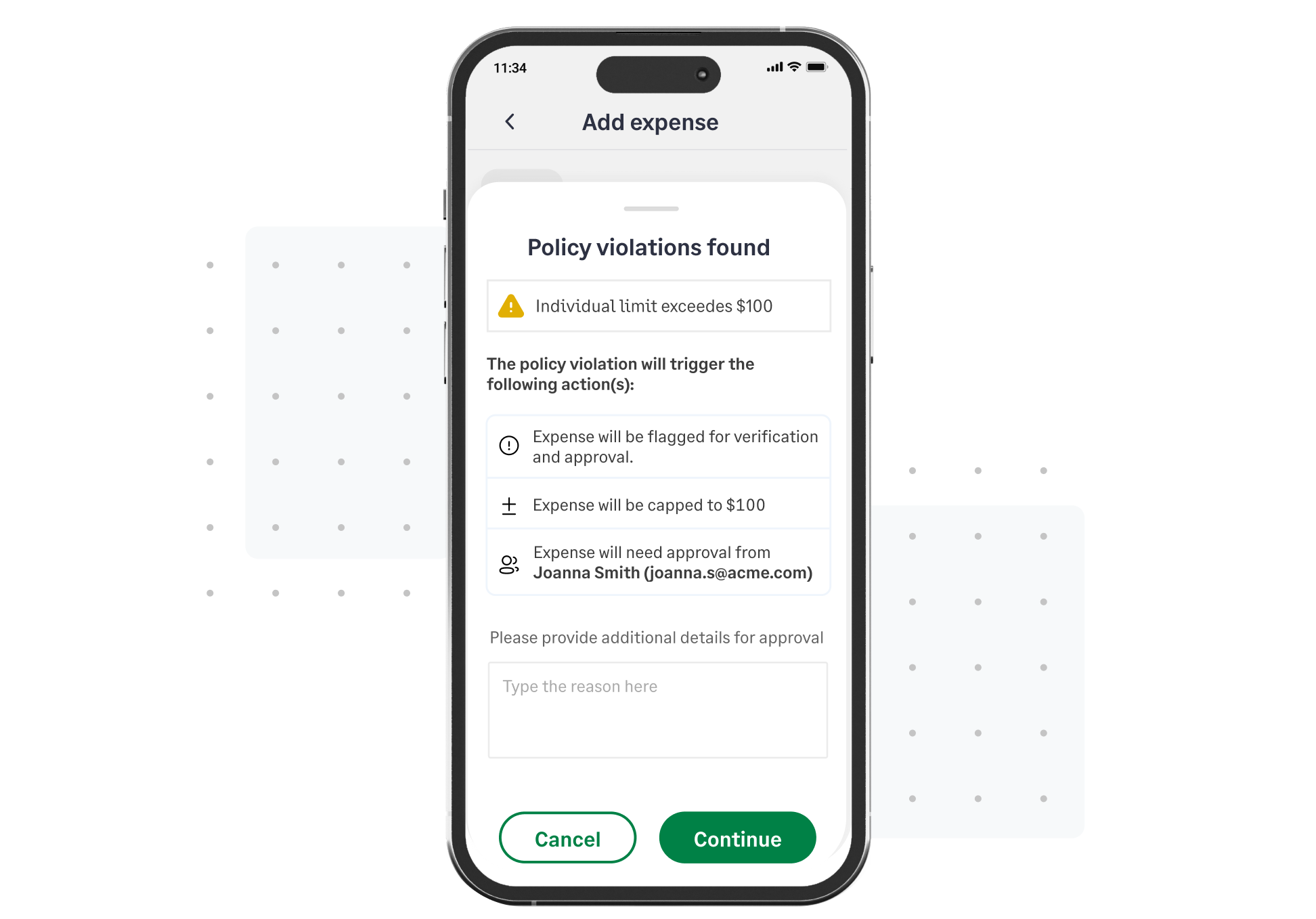
Sage Expense Management has a policy engine where you build your policy directly into the software. You can set rules for missing receipts, spending limits or duplicate detection.
It stops non-compliant expenses before they are even submitted, let alone reimbursed. This drastically reduces the risk of non-deductible expenses and internal fraud.
ERP & Accounting Integration
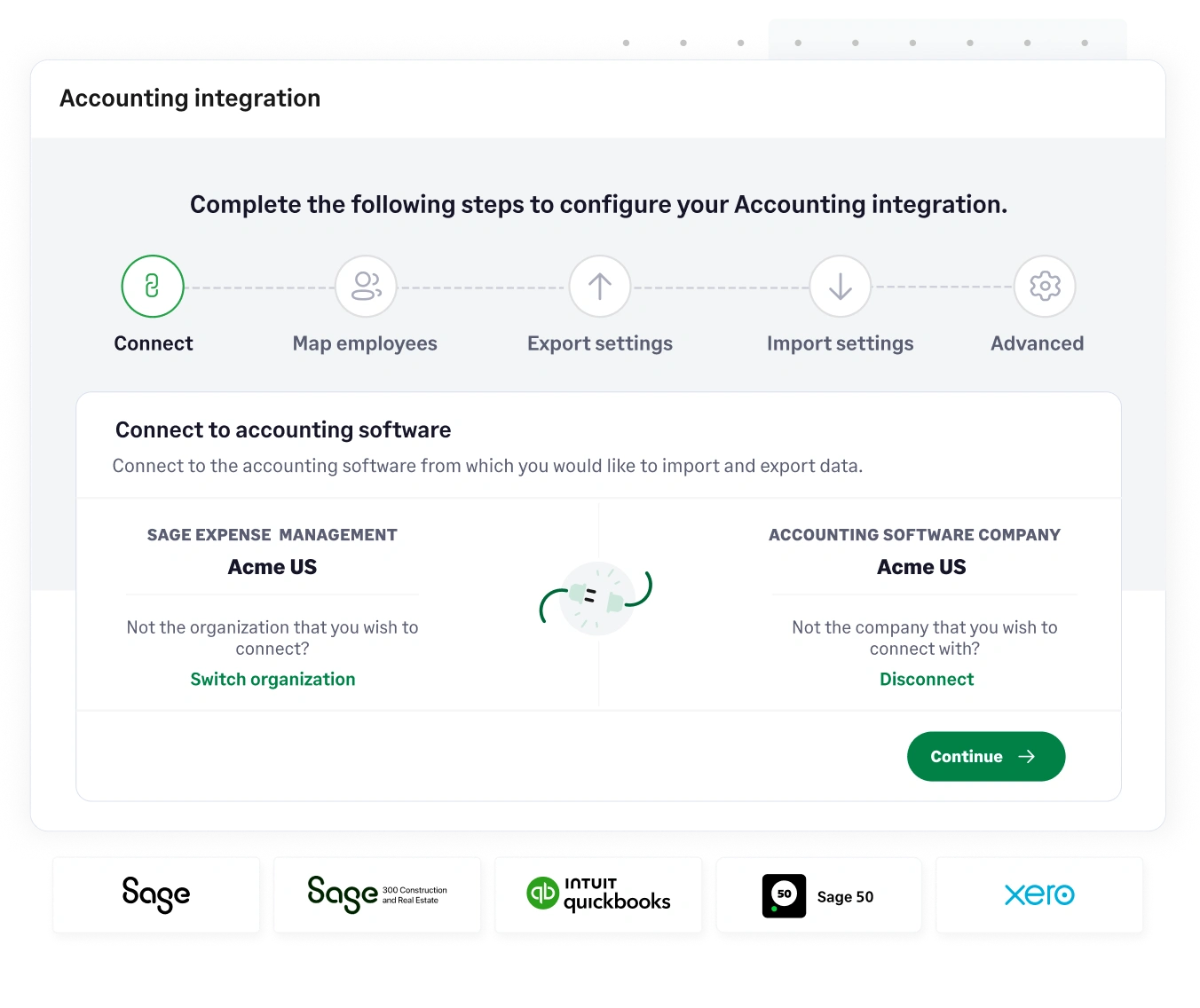
Sage Expense Management has a connection with your accounting system (Sage Intacct, QuickBooks Online, Xero, etc.). Instead of manually re-keying data from a spreadsheet into your general ledger, it automatically updates the system, so employees can never code an expense to an outdated project.
Automated Approval Workflows & Project Tracking

Our system can build custom, multi-level approval workflows. You can route expenses based on department, amount, or project code.
Expenses are routed to the right person, every time. You can delegate approvers for out-of-office managers. By forcing employees to code expenses to a project, you get real-time data on project profitability without waiting for month-end reports.
It’s Time to Retire the Spreadsheet
You aren’t saving money with free templates, you’re just trading a software license fee for thousands of dollars in wasted labour, data errors, and compliance risk.
A manual process is a time sink, it's risk-prone, and it's outdated. An automated process is real-time, compliant, and scalable.
It's time to give your team the right tools for the job.
{{templates-holding-back="/cta-banners"}}
.jpg)








