



You know the drill. It's the end of the month, and you're drowning in a sea of expense report spreadsheets. You spend hours, even days, chasing down employees.
The email chains and calendar reminders are endless. And inevitably, an employee pushes back with the most misunderstood question in expense management: "Do I really need a receipt for that $15 lunch? I thought we had a $75 rule."
This common confusion stems from a small IRS exception that many employees misinterpret as a get out of jail free card for recordkeeping. But this misunderstanding can cost your business thousands in disallowed tax deductions and trigger major red flags in an audit.
In this definitive guide, we'll clarify what the $75 rule means, what the IRS expects you to document, and how to build an audit-ready expense process that finally breaks the cycle of manual data entry and receipt chasing.
What Is the $75 Receipt Rule?

The IRS allows businesses to deduct ordinary and necessary business expenses, but only if those expenses are substantiated with adequate records. For most expenses, part of that adequate record is documentary evidence—a receipt, a paid bill, or an invoice.
According to IRS Publication 463, you generally need this documentary evidence for any expense of $75 or more. If an expense is under $75, the IRS does not require you to obtain and keep a receipt.
However, and this is the critical point, you are still legally required to prove the amount, date, place, and business purpose of that transaction. The rule is an exception for one piece of evidence (the receipt) to reduce paperwork, not permission to skip documentation altogether.
For example: An employee pays a $42 cash taxi fare. No receipt is required under the $75 rule. But you must still have a log recording the trip date, vendor (City Cab), purpose (Travel from airport to client meeting at Acme Inc.), and cost ($42).
IRS Recordkeeping 101: The 4 Elements

Waiving the receipt for a $40 expense doesn't waive the substantiation requirement.
The burden of proof is always on you, the taxpayer, to prove every deduction. To meet this burden, the IRS states your records must show the following four elements for every single expense, whether it's $5 or $5,000:
- Amount: The exact cost incurred.
- Time: The date the expense occurred.
- Place: The vendor or location of the expense.
- Business purpose: The reason for the expense and how it relates to your business.
For meals and entertainment, a fifth element is often required: Business Relationship. This includes the names, titles, or other information about the people you were with.
If you’re still relying on a manual expense report template, that business purpose field is your biggest compliance gap. An entry that just says lunch or client meal will be disallowed by an auditor.
Critical Exceptions: When the $75 Rule Doesn't Apply
The $75 rule is not a blanket policy. The IRS explicitly carves out certain expenses that always require a receipt.
Exception 1: Lodging (The Big One)
You must have documentary evidence (a receipt) for any expense for lodging, regardless of the amount. A $60 hotel bill still requires a receipt.
Why? An auditor needs to see an itemized hotel folio. A standard credit card charge doesn't show the breakdown of charges. An auditor needs to separate the deductible business cost (the room rate and tax) from non-deductible personal charges like in-room movies, mini-bar purchases, or gym fees.

Exception 2: Business Gifts
Gift deductions are capped at $25 per recipient per year. Because of this low, specific limit, the IRS expects documentary proof of the cost and nature of the gift to verify it's not a disguised (and non-deductible) entertainment expense.
Exception 3: Your Internal Company Policy
The IRS rule is the minimum standard for an audit. It is not a requirement for your internal expense policy.
You have the right to set a stricter policy. You can mandate receipts for all expenses, or for everything over $25. This is the simplest and safest way to manage compliance manually. It eliminates confusion and ensures you always have the documentary evidence you need.
The Role of an Accountable Expense Reimbursement Plan
All this recordkeeping isn't just a suggestion; it's the foundation of your entire reimbursement process. The IRS expects all reimbursements to occur under an accountable plan.

This is an official framework that proves you are reimbursing legitimate business expenses and not just paying employees extra (taxable) cash.
To qualify as accountable, your plan must meet three specific criteria:
- Business connection: The expense must have a clear business connection and be an ordinary and necessary cost of performing the job.
- Adequate substantiation: Employees must substantiate each expense (providing the 4 elements and receipts where required) within a reasonable period (typically 60 days).
- Return of excess funds: Any advance or allowance amount that is more than the substantiated expenses must be returned to the company within a reasonable period (typically 120 days).
If your plan fails even one of these tests, it is considered a non-accountable plan. The consequences are severe: all reimbursements made under that plan are treated as taxable wages. This increases your company's payroll tax liability (FICA, FUTA) and the employee's gross income.
For your finance team, that expense report template is your accountable plan. The risk is that a poorly designed template and a manual, trusting-based process doesn't truly enforce substantiation, putting your entire plan at risk.
How Long to Keep Records (and Why It Matters)
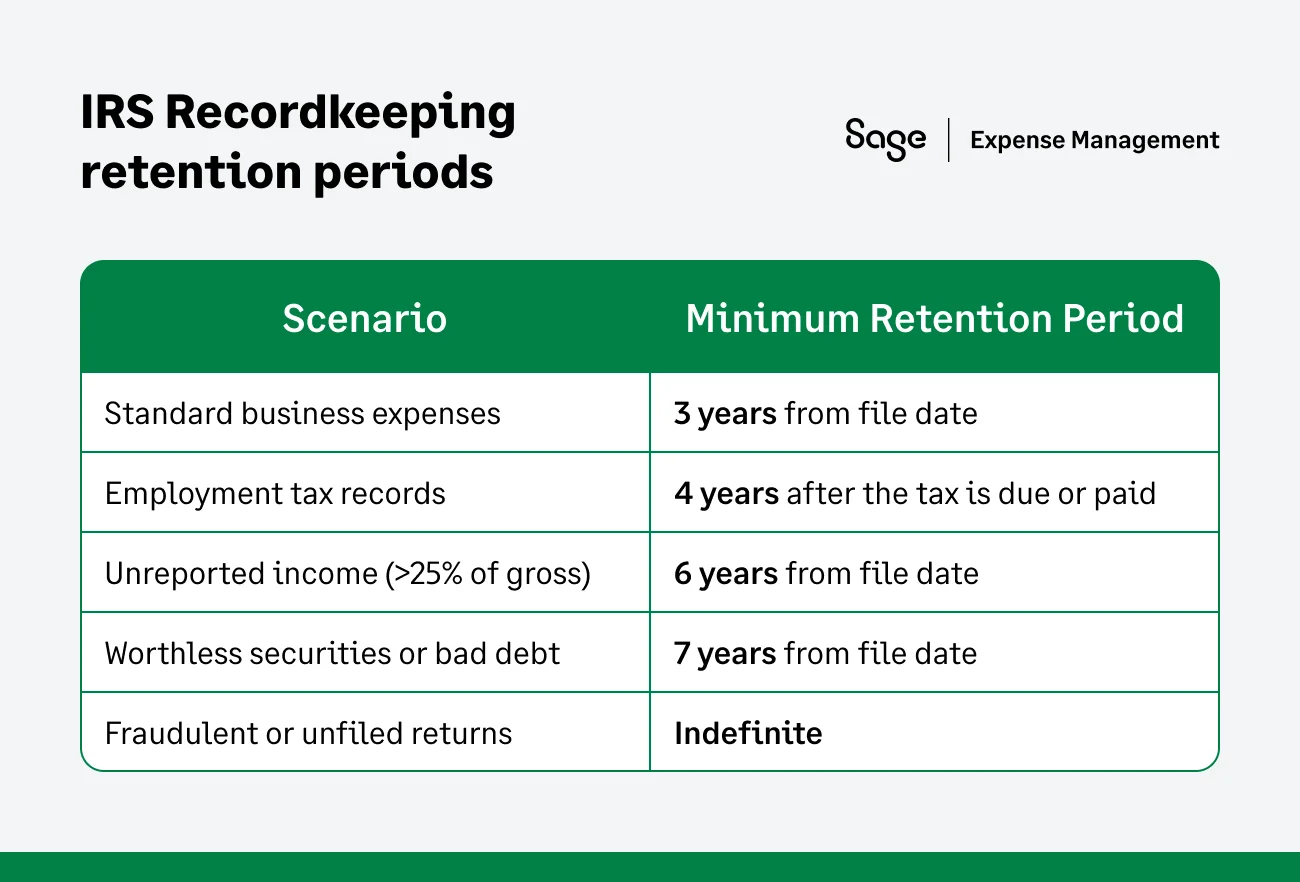
Your audit risk doesn't end when the month closes. The IRS generally has three years from the date you file your tax return to initiate an audit.
You must keep all supporting records for at least that long.
The good news? Digital Records are 100% acceptable.
You can stop hoarding shoeboxes full of paper. The IRS has recognized electronic and digital records (photos, scans, PDFs) as valid substitutes for paper originals for years.
The only requirements are that the records must be:
- Legible and accurate.
- Stored in a way that allows for easy retrieval.
- Protected from loss or alteration.
This is why just email me a photo isn't a scalable system. An email inbox is not a secure, retrievable, or organized recordkeeping system.
The Hidden Risks of Using Spreadsheets to Manage the $75 Rule
This is where the $75 rule, which seems simple, creates massive headaches for controllers relying on manual processes.
Risk 1: The Credit Card Statement Trap
When an employee loses a receipt, it's tempting to just use the credit card statement as a backup. This is a critical compliance gap.
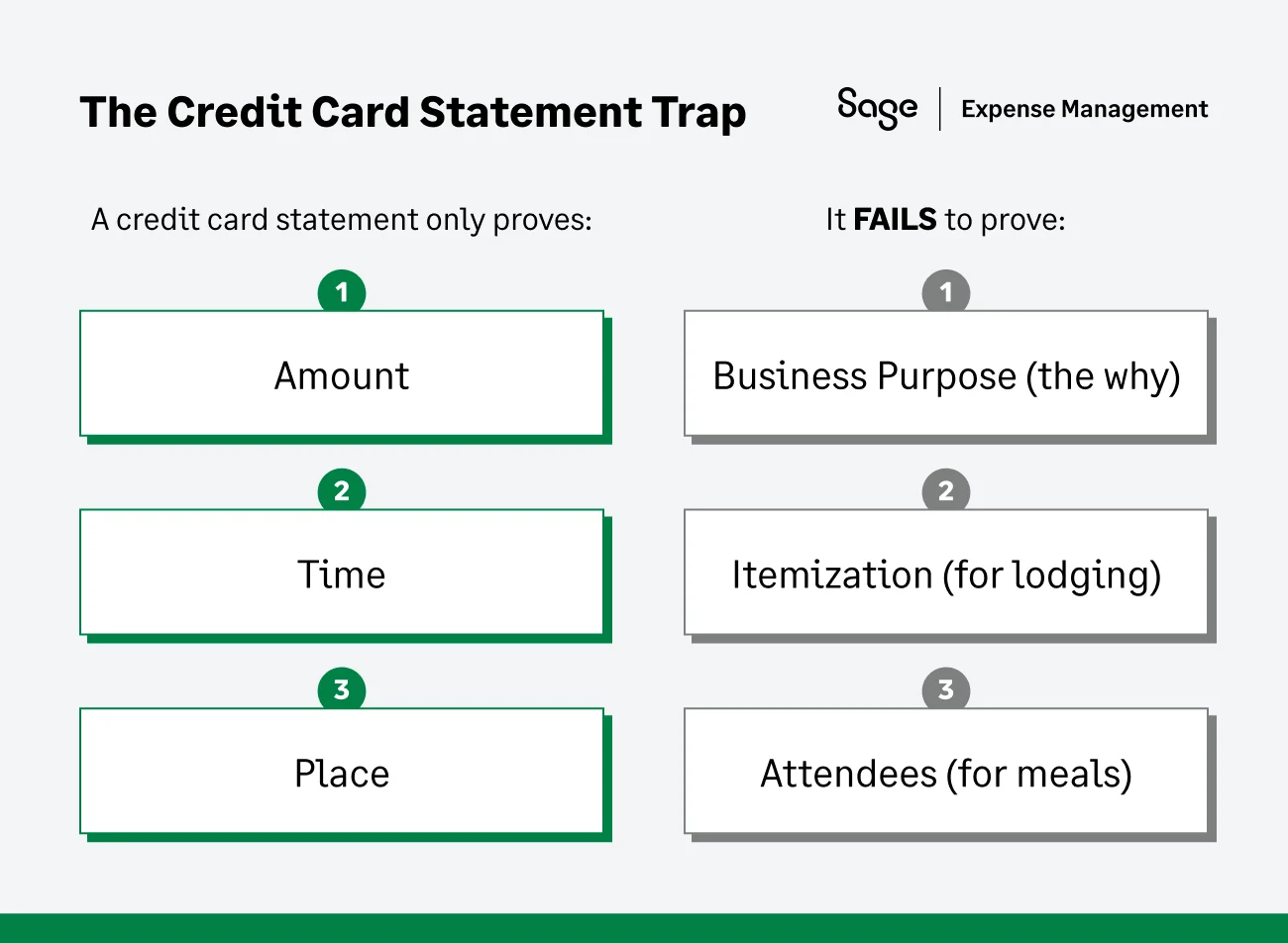
An auditor can disallow any expense that is missing its business purpose. Relying on a card statement is effectively handing them a reason to do so.
Risk 2: The Record Problem
The IRS gives far more weight to records created at or near the time of the expense.
When your employees fill out their expense templates at the end of the month, they are creating a historical record from memory. Here’s two ways it happens:
- Not at the same time: An employee filling out their May expense report on May 30th for a lunch on May 2nd.
- At the same time: An employee taking a picture of a receipt and adding a business purpose note seconds after the lunch.
A spreadsheet-based process cannot produce a truly contemporaneous record. In an audit, it's your employee's memory vs. the auditor's scepticism.
Risk 3: The Finance Team Become the Compliance Bottleneck
With spreadsheets, the burden of enforcement falls 100% on you. You must be the one to:
- Manually check if an expense over $75 has a receipt.
- Manually check if a lodging expense under $75 still has a receipt.
- Manually chase the employee for the missing business purpose on that $50 charge.
This isn't just frustrating; it's a massive, unquantified time cost—a key customer trigger. Market data shows the average cost to manually process one expense report can be as high as $110. This manual policing is a time and money drain that spreadsheet-based teams are forced to accept.
{{irs-rules="/cta-banners"}}
Best Practices for Manually Tracking Expenses (If You Must)
If you're not ready to automate, you can reduce your compliance risk by strengthening your manual process.
Train Your Employees
Hold a 30-minute training session. Explain that under $75 does not mean no record. Show them the 4 essential elements and explain why business purpose is non-negotiable.
Update Your Expense Template
Make the business purpose and attendees (for meals) fields mandatory for every single line item. Use data validation in Excel to force correct formatting.
Create a Central Digital Folder
Mandate that all receipt photos be stored in a shared, organized drive (e.g., SharePoint or Google Drive), named by Date_Employee_Vendor. An email inbox is not an audit-ready archive.
Better Safe than Sorry
The safest manual policy is to require a receipt for everything. It may increase friction, but it is the single best defence in an audit.
Why Automation Is The Next Best Step?
While the manual best practices listed above can reduce your audit risk, they come at a steep price: your time.
Implementing strict manual policies turns your finance team into the expense police. You are forced to spend valuable hours checking dates, verifying business purposes, and sending emails about missing receipts. As your company grows, this manual oversight becomes mathematically impossible to scale.
You cannot police every transaction personally, and nor should you have to.
The most effective way to handle the nuance of the $75 rule isn't to work harder; it's to adopt a system that enforces the rules for you. Automation shifts the burden of compliance from people (who forget) to a platform (which doesn't).
Automating IRS Compliance using Sage Expense Management
The fundamental problem is that the $75 rule adds complexity. This is where automation transforms your process. Sage Expense Management isn't just a digital template; it's a compliance engine that enforces your policy before an expense ever reaches you.
Here is how it helps:
It Enforces the $75 Rule Automatically
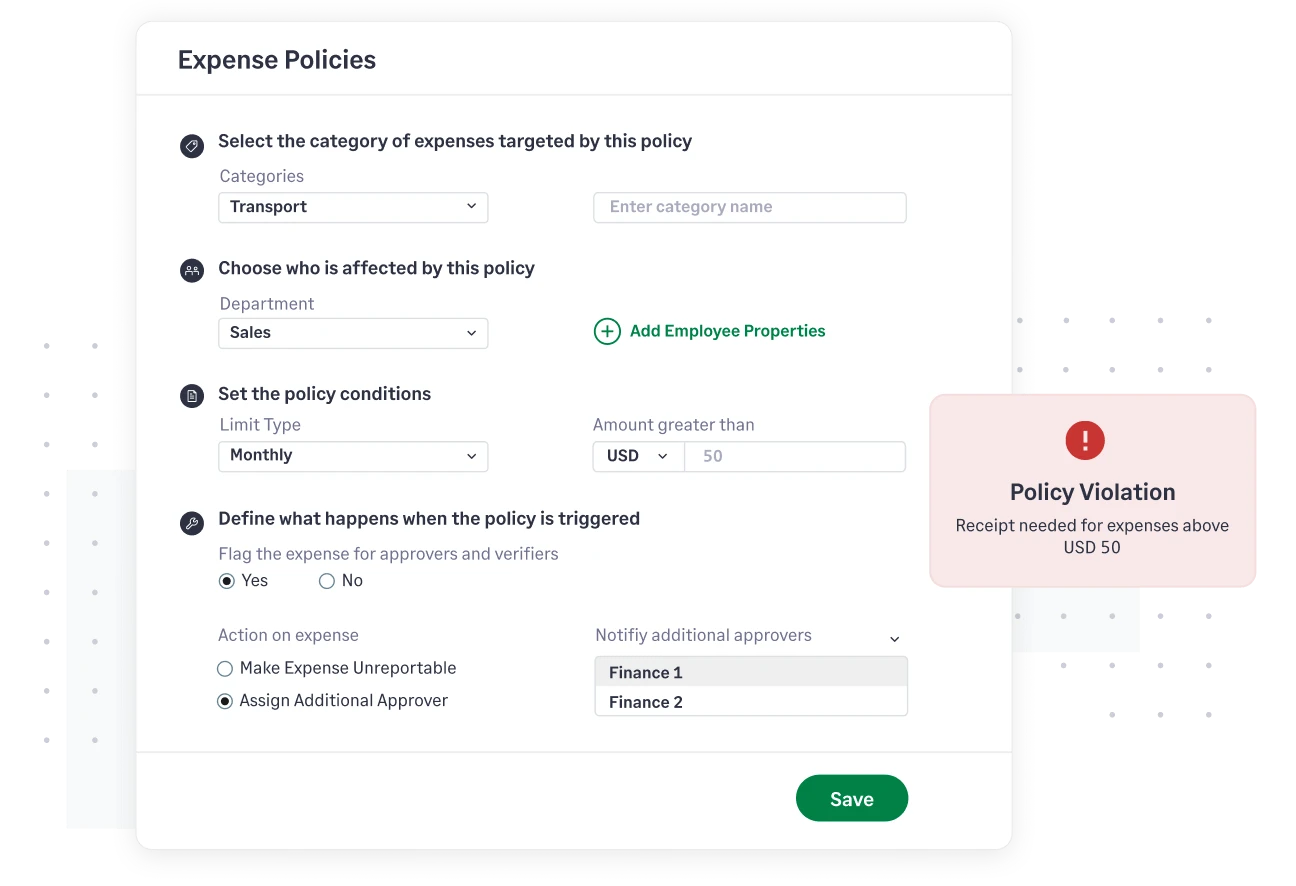
You set the policy one time. The system can be configured to automatically flag and block any expense over $75 submitted without a receipt. It can also be configured to require a receipt for 100% of lodging expenses, regardless of cost.
It Solves the Record Problem
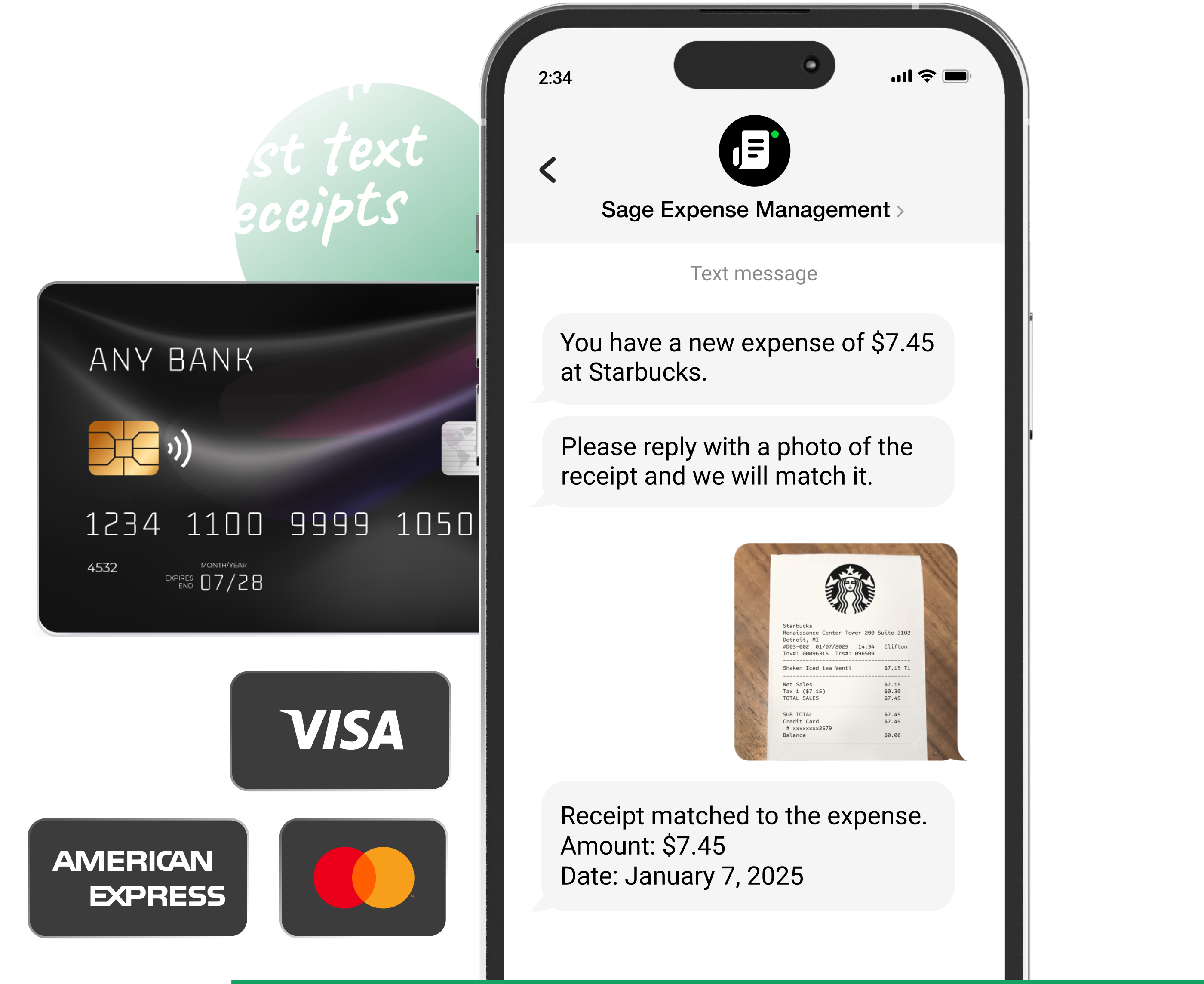
Sage Expense Management directly integrates with major credit card networks to record transactions in the system seconds after the card is swiped. The employee is instantly prompted via text message or the mobile app to add the business purpose and snap a photo of the receipt. This creates a perfect, time-stamped, record which auditors love.
It Closes the Credit Card Statement Gap
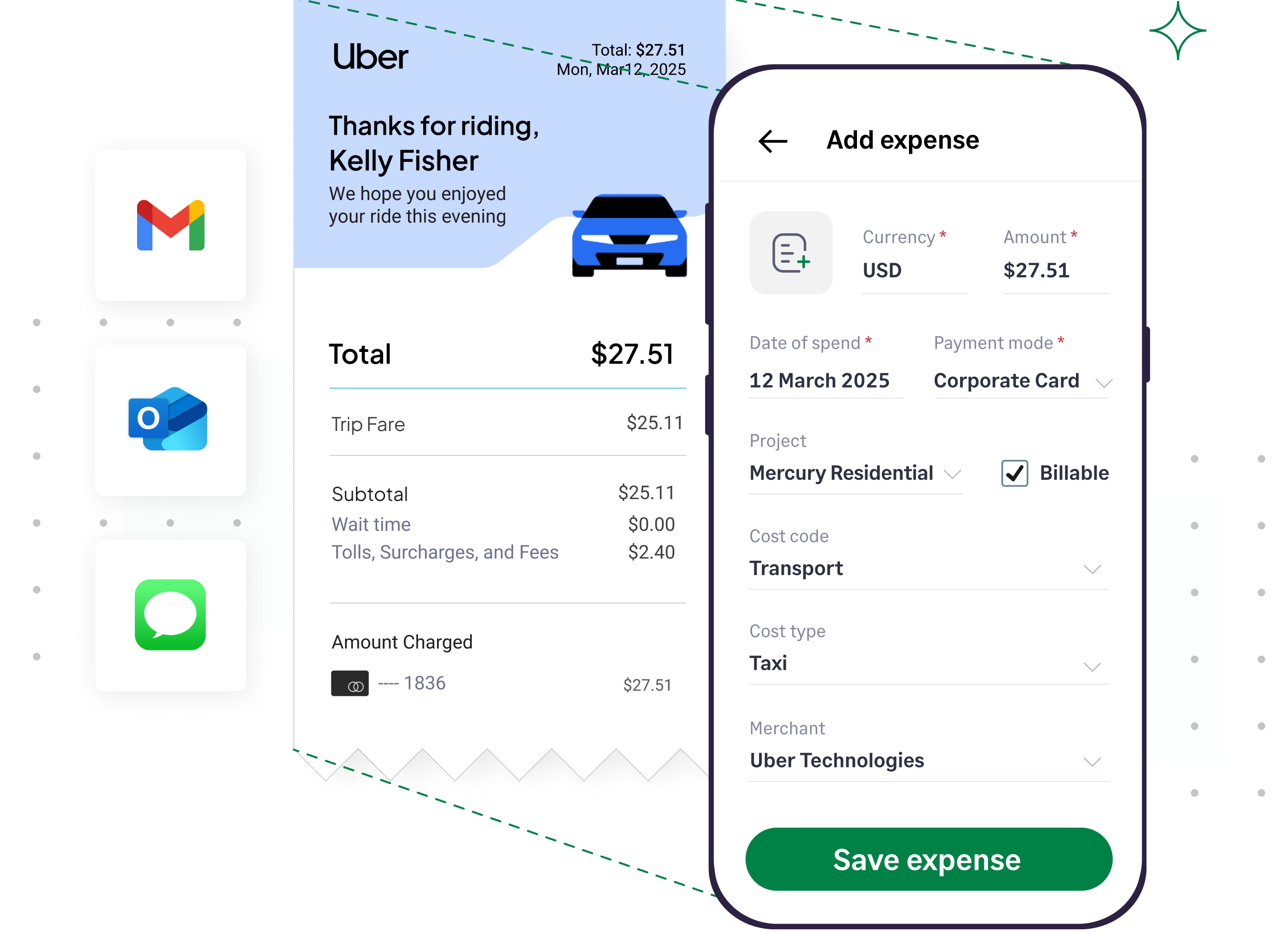
Employees can submit receipts via text message, email, or the Sage Expense Management mobile app, instantly linking them to a transaction. This creates a unified record, eliminating the reconciliation nightmare.
With automation, your finance team spends zero-time policing expenses and 100% of that reclaimed time on strategic work like budget analysis and optimizing cash flow.
Stop Chasing Receipts, Start Building a Compliant System
The $75 rule isn't a free pass. It’s a nuance that makes manual recordkeeping harder, not easier. It shifts the burden from simply collecting paper to proving data for every single transaction.
Your expense report template is a tool for tracking. An automated system is a platform for compliance. To protect your deductions and reclaim your time, you need a system that makes compliance invisible, effortless, and audit-ready from the moment of the swipe.
{{75-closing-cta="/cta-banners"}}
.jpg)








